
High Frequency Audiometry

By Interacoustics

What is high frequency audiometry?

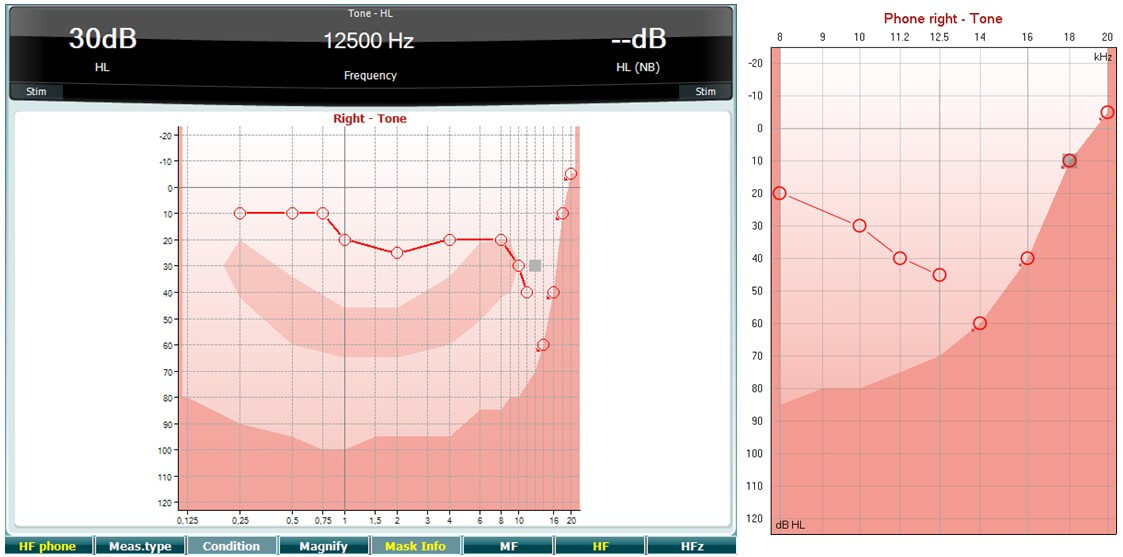
High frequency audiometry (above 8 kHz) is performed using the same procedure as normal air conduction audiometry. High frequency audiometry is helpful when testing hearing impairments caused by ototoxicity, noise exposure, and acoustic traumas or in the assessment of patients with tinnitus. The frequency area is more susceptible to the effects of external factors such as medication and loud noises relative to the low and mid frequencies.
Required equipment

  • A response button.
  • High frequency audiometry headset (e.g. DD450) and a high frequency license installed.

Note high frequency audiometry is only available if the optional high frequency license is installed on the instrument. If the license is not installed or if the headset is not calibrated for high frequencies the HF phone button does not appear on the audiometer and the HF button and HFz button will be dimmed in Diagnostic Suite.

Test procedure

  1. Select the Tone and HF Phone; this will activate the high frequency audiometry function .

  2. Choose between HF and HFz; shows the full range of audiometric test frequencies, whereas HFz only shows the high frequency range or in Diagnostic

  3. Perform high frequency audiometry in the same way you would perform normal air conduction audiometry.

Presenter

Interacoustics

Available Training

Alternate Binaural Loudness Balance Test

Learn how to perform the alternate binaural loudness balance (ABLB) test with the AD629 diagnostic audiometer, including results interpretation.

Interacoustics2026-10-02

Audiometric Masking

Learn how to perform audiometric masking with the AD629 diagnostic audiometer.

Interacoustics2026-10-02

Békésy Audiometry

Learn how to perform the Békésy audiometry test with the AD629 diagnostic audiometer, including the Békésy audiometry types for results interpretation.

Interacoustics2026-10-02

BKB-SIN speech-in-noise test

In this quick guide, you will learn how to use the BKB-SIN speech-in-noise test provided with the Interacoustics AD629 diagnostic audiometer. Read more.

Interacoustics2026-10-02

How to print without a database

Click here to learn about the three options you have for printing without a database with the AD629 diagnostic audiometer.

Interacoustics2026-10-02

Hughson-Westlake Procedure

Learn how to perform the Hughson-Westlake procedure with the AD629 diagnostic audiometer.

Interacoustics2026-10-02

Pure Tone Audiometry

Learn how to perform pure tone audiometry with the AD629 diagnostic audiometer.

Interacoustics2026-10-02

Quick Speech in Noise (QuickSIN)

Learn how to perform the quick speech in noise (QuickSIN) test with the AD629 diagnostic audiometer, including results interpretation.

Interacoustics2026-10-02

Short Increment Sensitivity Index

Learn how to perform the short increment sensitivity index (SISI) test with the AD629 diagnostic audiometer.

Interacoustics2026-10-02

Speech Audiometry

Learn how to perform speech audiometry with the AD629 diagnostic audiometer, including results interpretation.

Interacoustics2026-10-02

Stenger Test

Learn how to perform the Stenger test with the AD629 diagnostic audiometer.

Interacoustics2026-10-02

Threshold Equalizing Noise (TEN) Test

Learn how to perform the threshold equalizing noise (TEN) test with the AD629 diagnostic audiometer, including results interpretation.

Interacoustics2026-10-02

Weber Test

Learn how to perform the Weber test with the AD629 diagnostic audiometer, including results interpretation.

Interacoustics2026-10-02