
How to perform the Gaze test

By Interacoustics

What is the gaze test?

The gaze test measures the patient's ability to maintain a steady gaze on an object at various angles without the eye generating extraneous movements (i.e. square wave jerks or nystagmus). The inability to maintain a steady gaze is an indication of either a central or peripheral vestibular system lesion. Gaze positions tested are: center (straight ahead), gaze left, gaze right, gaze up and gaze down.

Patient instructions

"You will see a green dot on the screen. Simply look at the dot. If the dot moves, follow it with your eyes only. Try not to move your head."

Normal gaze results

A patient with normal gaze ability will produce a tracing that is virtually a straight line once the eyes are fixated on the target. The right eye is represented by the red line and the left eye by the blue line. If nystagmus is present it will be identified by triangles on the eye position graph to represent each detected nystagmus beat. The average slow phase velocity value(s) will be plotted in the bar graphs to the right of the tracings. When the average slow phase velocity exceeds the threshold value of 60/sec, the bar graph will be shaded grey and a red diamond will appear near the bar graph to indicate an out of threshold response.
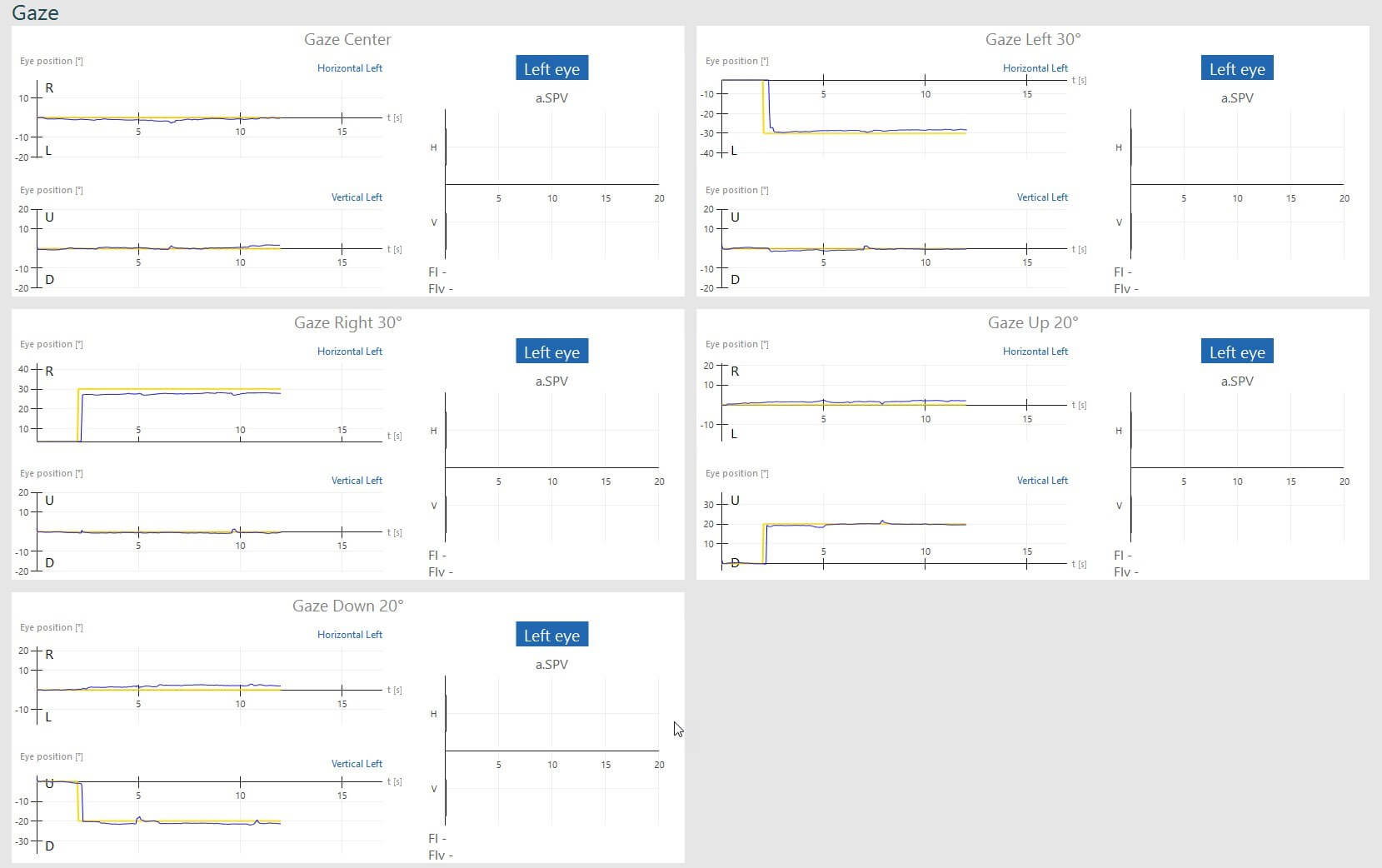
Gaze results overview, including gaze center, gaze right 30 degrees, gaze down 20 degrees, gaze left 30 degrees, and gaze up 20 degrees. For all subtests, the blue curve for eye position follows the yellow curve for target position almost perfectly.

Gaze test showing normal response for all gaze angles (center, left, right, up and down)

Abnormal gaze results

An "abnormal" gaze tracing might present itself in several ways. A patient may present with square wave jerks, nystagmus, or gaze decay. Below are examples of abnormal tracings:
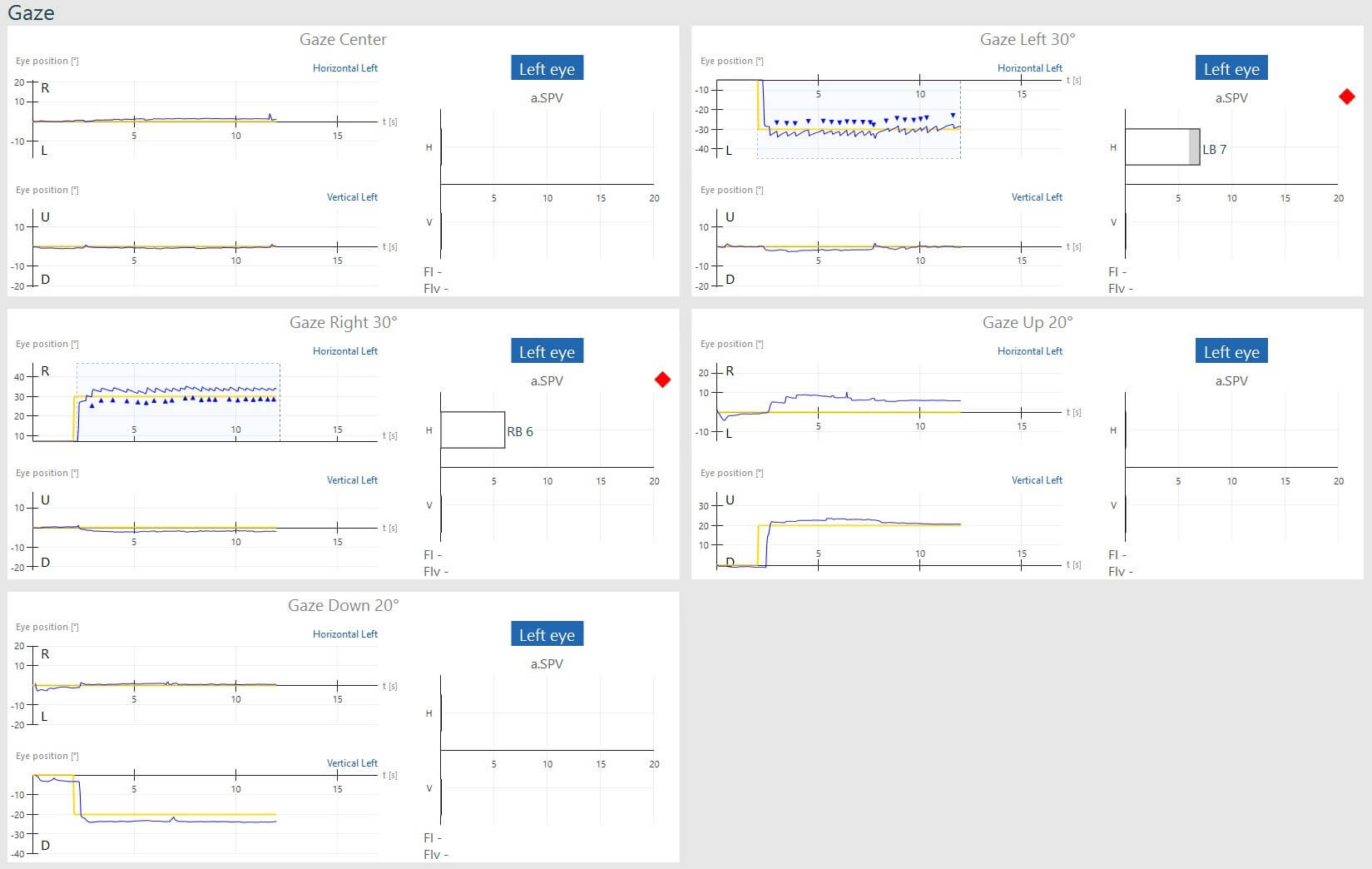
Gaze results overview, including gaze center, gaze right 30 degrees, gaze down 20 degrees, gaze left 30 degrees, and gaze up 20 degrees. For gaze right and left 30 degrees, horizontal left, the blue curve for eye position is jagged, indicating nystagmus. For right 30 degrees, the average slow phase velocity of the nystagmus is 6. For left 30 degrees, the average slow phase velocity of the nystagmus is 7. The nystagmus peaks are marked with a blue triangle, and the failed subtests are flagged with a red diamond.

Gaze test showing bilateral gaze-evoked nystagmus
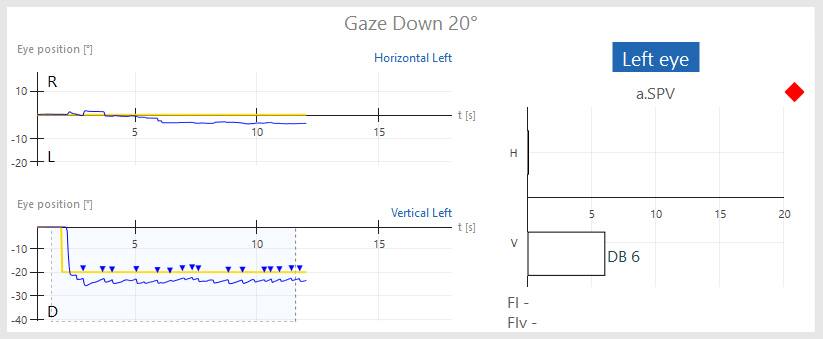
Gaze results overview for gaze down 20 degrees. For vertical left, the blue curve for eye position is jagged, indicating nystagmus. The average slow phase velocity of the nystagmus is 6. The nystagmus peaks are marked with a blue triangle, and the subtest is flagged with a red diamond.

Gaze test showing down-beating nystagmus on gaze down 200

Conclusion

Gaze testing is the ONLY test of the four ocular tests in which an "abnormal" result could be generated either from the peripheral vestibular system or from the central vestibular system. For a complete discussion of differential diagnosis using the gaze test, refer to:

Jacobson, GP, and Shepard, NT. Balance Functional Assessment and Management, 2nd Ed. San Diego; Plural Publishing, 2015

*NOTE: This is intended only as a guide, official diagnosis should be deferred to the patient's physician.

Presenter

Interacoustics

Available Training

How to perform the Active Head Rotation test

Learn how to perform the active head rotation (AHR) test in the VisualEyesTM software.

Dr Michelle Petrak2026-10-02

How to perform the Advanced Dix-Hallpike test

In this guide, you will learn how to perform the Advanced Dix-Hallpike using the VisualEyesTM videonystagmography (VNG) system.

Dr Michelle Petrak2026-10-02

How to perform the Brandt-Daroff Exercise

Click here to learn how to perform the Brandt-Daroff Exercise.

Interacoustics2026-10-02

How to perform calibration procedures

In this guide, you will learn how to calibrate the VisualEyesTM videonystagmography (VNG) system.

Dr Michelle Petrak2026-10-02

How to perform the Caloric test

Learn how to perform the caloric test with videonystagmography (VNG) equipment.

Interacoustics2026-10-02

How to perform Cervical Gaze testing

Two additional gaze positions are now available in VisualEyesTM 525 as an option to include in your test battery: Center Body Left and Right. Learn more.

Dr Liz Fuemmeler2026-10-02

How to perform the Dix-Hallpike test

Learn how to perform the Dix-Hallpike test, including precautions, patient instructions, the step-by-step test procedure, results interpretation, and more.

Interacoustics2026-10-02

How to perform the Dynamic Visual Acuity (DVA) test

Learn how to perform the dynamic visual acuity (DVA) test in the VisualEyesTM software.

Dr Michelle Petrak2026-10-02

How to perform the Epley Maneuver

Learn how to perform the Epley Maneuver for treatment of posterior canal BPPV. Includes a step-by-step procedure with images and helpful hints. Read more.

Interacoustics2026-10-02

How to use VisualEyesTM EyeSeeCam

In this guide, you will learn how to use the EyeSeeCam vHIT software within the VisualEyesTM videonystagmography (VNG) system.

Dr Michelle Petrak2026-10-02

How to perform the Functional Vision Head Impulse Test (fvHITTM)

The Functional Vision Head Impulse Test (fvHITTM) provides functional information on how clearly the patient sees in response to quick head impulses. Read more.

Dr Liz Fuemmeler2026-10-02

How to perform the Gaze Stabilization Test (GST)

Learn how to perform the Gaze Stabilization Test (GST) in the VisualEyesTM software. Click here to read more.

Dr Michelle Petrak2026-10-02

How to perform the Gufoni Maneuver

Learn how to perform the Gufoni Maneuver in this short guide. Includes a step-by-step procedure with images and helpful hints. Read more.

Interacoustics2026-10-02

How to set up and troubleshoot monitors for oculomotor and optotype tests

In this quick guide, you will learn how to set up and troubleshoot monitors for oculomotor and optotype tests in the VisualEyesTM software. Read more.

Dr Liz Fuemmeler2026-10-02

How to use keyboard shortcuts in VisualEyesTM

VisualEyesTM has several software functions that are available through a computer keyboard. These allow for the user to access quick buttons for easy navigation.

Dr Liz Fuemmeler2026-10-02

How to perform the Lateral Head Roll test

Learn how to perform the lateral head roll (LHR) test with the VisualEyesTM software.

Dr Michelle Petrak2026-10-02