
How to perform the ACT™ test (step-by-step)
In this quick guide, you will learn how to perform the Audible Contrast Threshold (ACT) test.
What is the ACT test?
The ACT test is an above-threshold, non-language specific test that quantifies a person's real-world ability to hear in noise. The test applies the shape and levels of the audiogram to ensure the correct stimulus intensity is applied.
Pre-test counseling guidance
You can perform ACT on any adult client that you deem suitable to perform pure tone audiometry. It may be useful to counsel the client on the reason for performing ACT. Here, you will find an example script.
"We will perform a test called ACT. The result from this test will clarify your abilities to hear in background noise. This can be challenging, particularly if you have a hearing loss. So, performing this test will help me to know to what degree this is also a challenge for you."
Required equipment
To perform an ACT test, you will need:
- Affinity Compact, Equinox Evo, or CallistoTM
- Patient response button
- Connected PC and keyboard
- Headphones or insert earphones
- Licensed AC440 audiometry module including an ACT license
Points to note
It is a good idea to listen to the acoustic stimuli over monitor headphones during the test. This will help you to present the target stimuli in an unpredictable manner.
To perform ACT, you must complete an audiogram for air conduction at the following frequencies:
- 250 Hz, 500 Hz, 1000 Hz, 2000 Hz, 4000 Hz.
- Inter-octave frequencies will be considered in ACT testing if you have completed them.
Should the following notification appear: 'Insufficient data to complete the test', please ensure you have stored all mandatory thresholds for both ears. A 'no response' will be factored into the ACT test, but a 'Could not test' or 'Did not test' will be excluded and you will not be able to complete the ACT test.
ACT test procedure
1. Launch your Affinity/Equinox Suite or Callisto Suite into AUD mode.
2. Ensure there is an audiogram inserted into the current session.
3. Click on 'Menu'.
4. Click on 'Test'.
5. Select ACT.
6. The instructions will pop up in a separate window (Figure 1). Read the instructions to the client. Use the 'sound examples' to demonstrate and explain the test procedure. You can play these sound examples as many times as is necessary to familiarize the client.
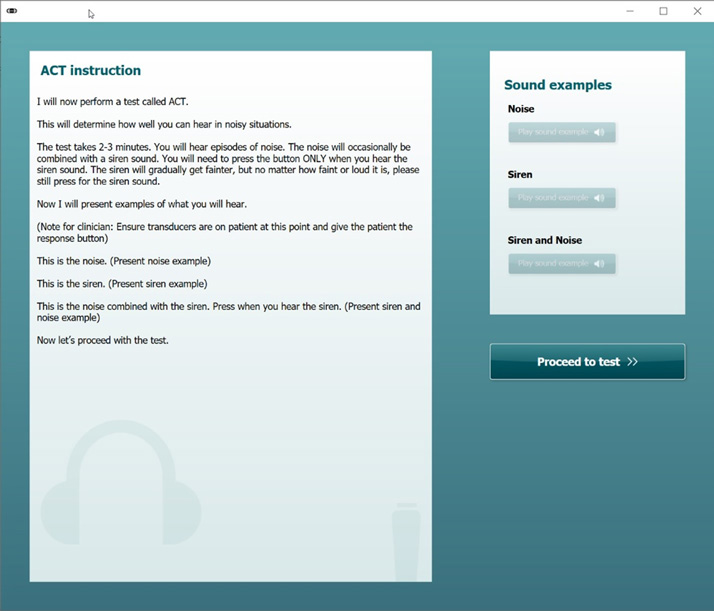
7. Once you are confident that the client has understood the test, click 'Proceed to test'.
If you wish to read instructions again at any point, click on 'i' in the left-hand menu (Figure 2).
8. Press START.
A sequence of noise episodes will start.
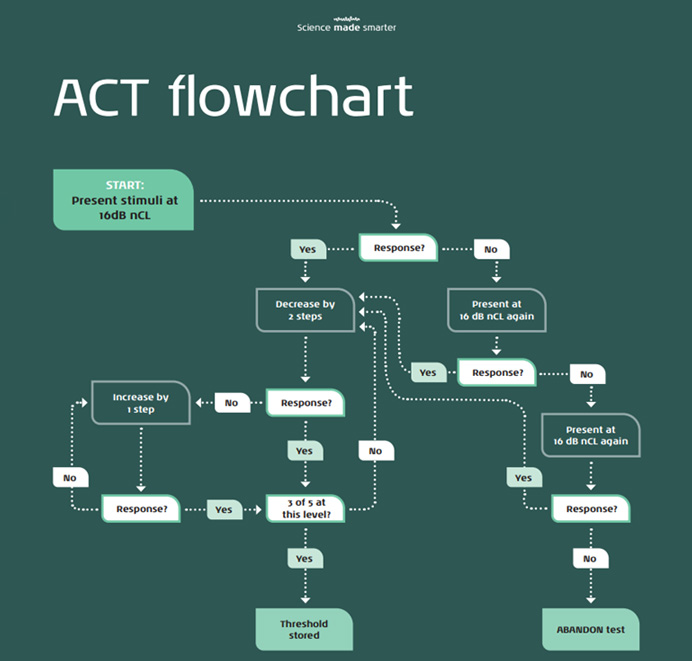
You perform the test in the same way as pure tone audiometry using the Hughson-Westlake adaptive method (2 down, 1 up) with a 3 out of 5 criterion (Appendix 1).
Present the stimulus by clicking once on your chosen presentation key. If you press 'spacebar' to present a stimulus, press this once. Do not press and hold.
A black dot appears automatically when the client correctly hears the target stimulus. A white dot appears automatically when the client has not heard the stimulus or has not responded in the viable time frame (Figure 3).
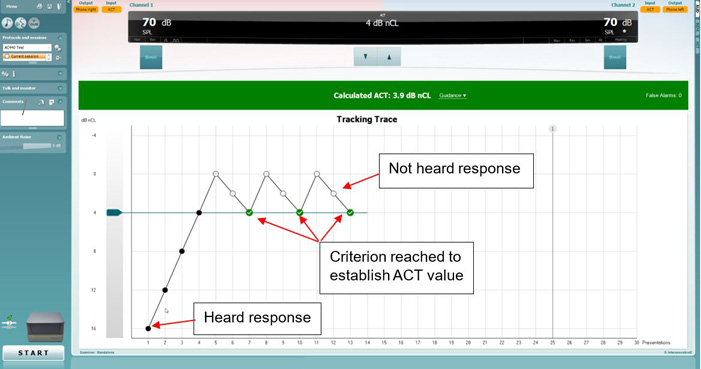
Optional: If you are not confident that your client knows when to respond after presenting the sound examples within the instruction box, try starting the test and perform 3 presentations at 16 dB nCL. Then continue as in step 8.
9. Once you have reached the required number of thresholds to produce an ACT value, the test will automatically stop. The calculated ACT value is then stored in the middle of the green band across the screen.
Points to consider:
- You can stop the test at any point by pressing the 'STOP' button.
- You should consider false alarms. There is no set limit for false alarms, and you should assess the trace and the patient feedback to make an informed decision when accepting the ACT value.
- If the test exceeds 25 presentations (indicated as a line on the trace), there is a higher risk of client fatigue. Please refer to scenario 3 below for guidance on how to address this.
Guidance on what to do in case of inconsistent responses during the test
Every client is different and may not follow normative patterns when conducting ACT. Below are some examples on what you can do based on irregular responses.
Scenario 1: Client keeps pressing response button despite no stimulus
The client has many false positives (responds at the right time but has not heard the signal) or presses the button too often. Keep note of the false-alarms indication on the right-hand side of the screen. To solve this, increase the nCL to 4 dB nCL above the expected threshold (or even higher) to remind the client what to listen for and return to the previous level (Figure 4).
Scenario 2: Client is losing concentration
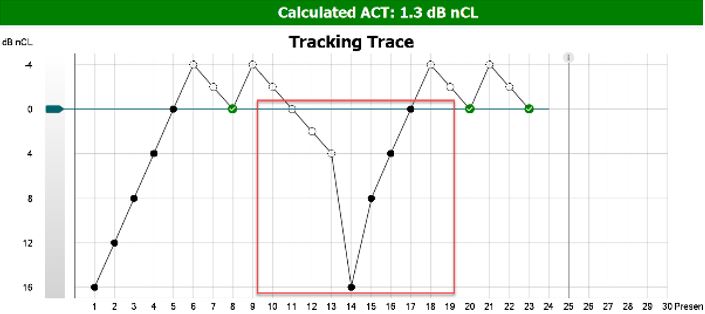
The client is close to obtaining a threshold but loses concentration and fails to respond at levels detected before. To solve this, increase the nCL to a detectable level (e.g. 16 dB nCL) to remind the client what to listen for (Figure 5).
Scenario 3: The run exceeds 25 presentations
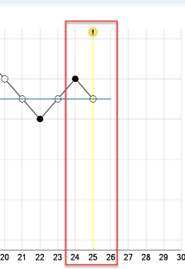
The run reaches 25 presentations and there is no threshold in sight (Figure 6). There is a higher risk of client fatigue at this point. To solve this, give the client a break, and reâ€iterate the instructions if needed. You can also perform ACT in a separate appointment, as long as the client's audiogram is present.
Scenario 4: Client responds unexpectedly
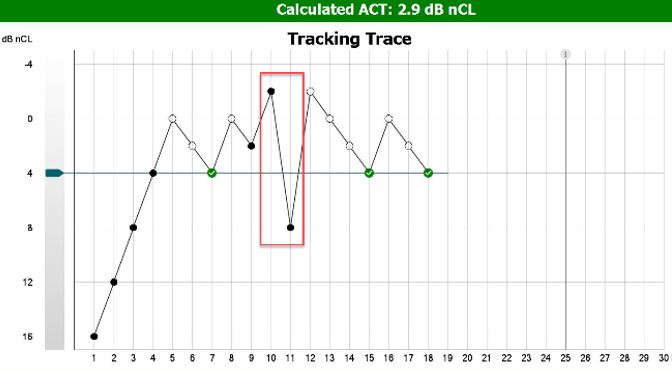
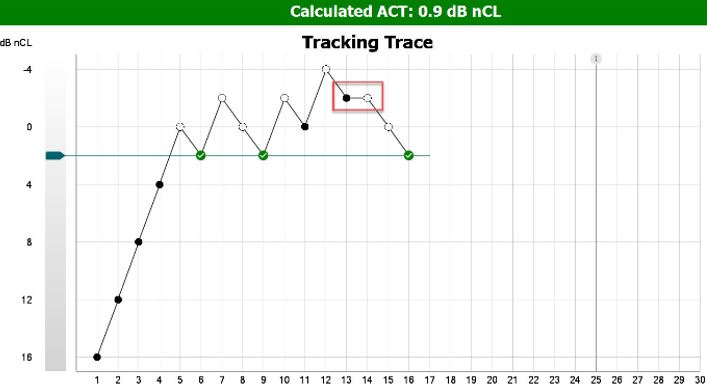
An otherwise reliable client responds against your expectation. To solve this, present the stimulus again at the same dB nCL to make sure the first response was not a coincidence (Figure 7).
Post-test counseling guidance
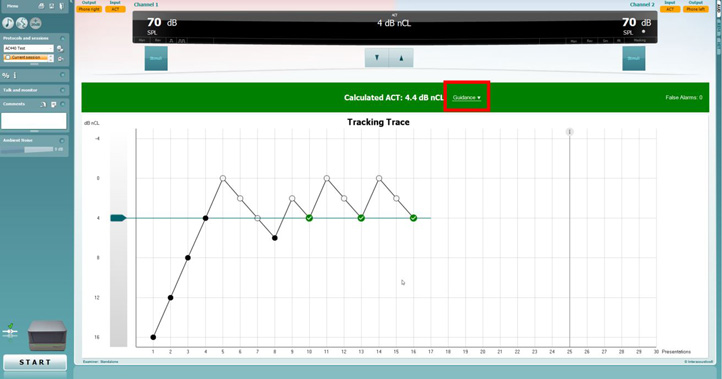
To access the post-test counseling guidance, click the 'Guidance' drop box in the middle of the screen (Figure 8). This will reveal the ACT severity categories with accompanying fitting advice (Figure 9).
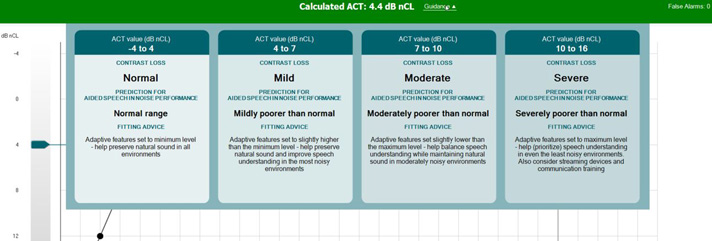
Now that you have obtained your ACT value, you can use this in many ways, such as:
- Recommend assistive listening devices
- Set the adaptive features in all hearing aids
- Focus on rehabilitation and communication strategies
- Use selected hearing aids to automatically prescribe adaptive features
- Counsel clients on their prediction of how well they will cope in noisy situations
Appendix 1
Presenter
