
How to perform frequency lowering verification

By Interacoustics

How to determine if frequency lowering should be applied

1. Launch Affinity/Callisto Suite.

2. Ensure an audiogram is entered.

3. Navigate to REM module.

4. Fitting prescription setting will automatically pop up, adjust as needed, then click 'Okay'.

5. Make sure to go into settings for the measurements and activate percentile analysis (Figure 1).
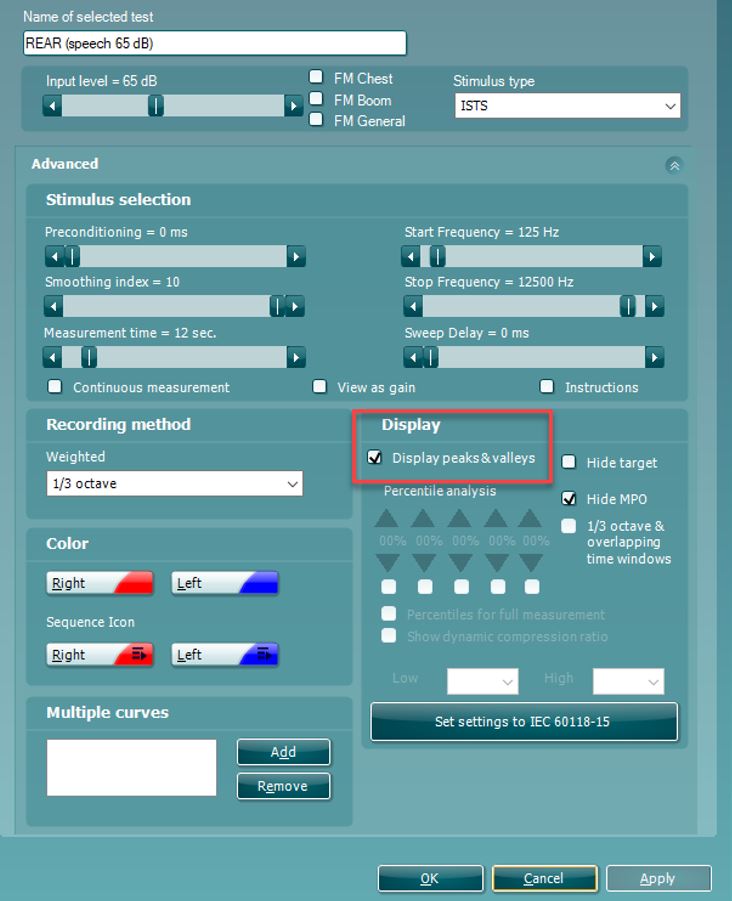
 

Figure 1: Enabling percentile analysis.


6. Perform Real Ear Measurements as per usual and fit your hearing aids to target:

  • Make sure to run the 'Calibrate for Open Fit' with the /ss/ stimuli along with the usual ones.
  • You need to measure an LTASS at 65 dB SPL as minimum (Figure 2).
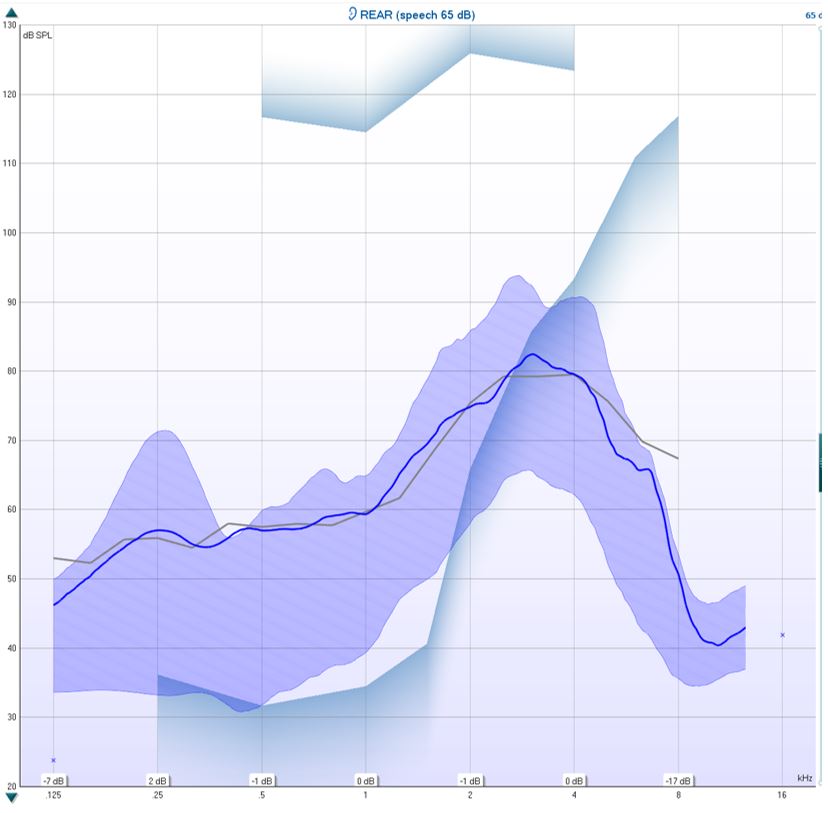
 

Figure 2: LTASS 65 dB measurement.


7. Determine the MAOF value. You determine your MAOF value from the point at which the LTASS crosses threshold to the point at which the peaks of speech crosses threshold (Figure 3).
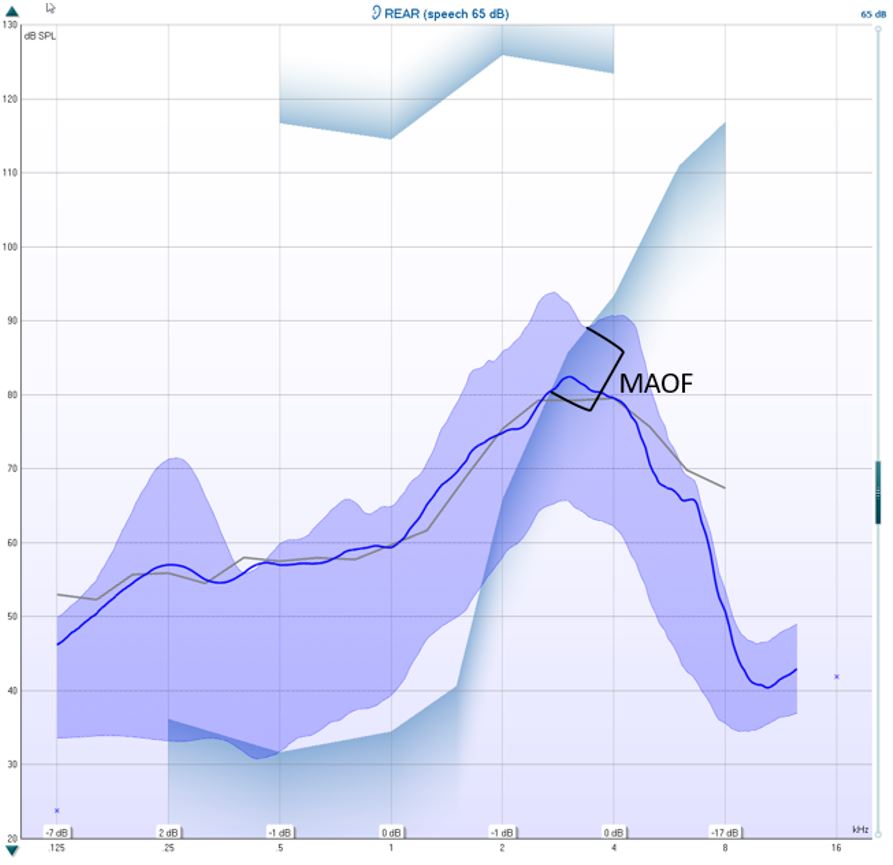
 

Figure 3: Determining the MAOF value.


In the example above, the MAOF has been marked, and your calculated MAOF value is at where the upper speech percentile crosses the threshold. In this example, it would be 3400 Hz (Figure 4).
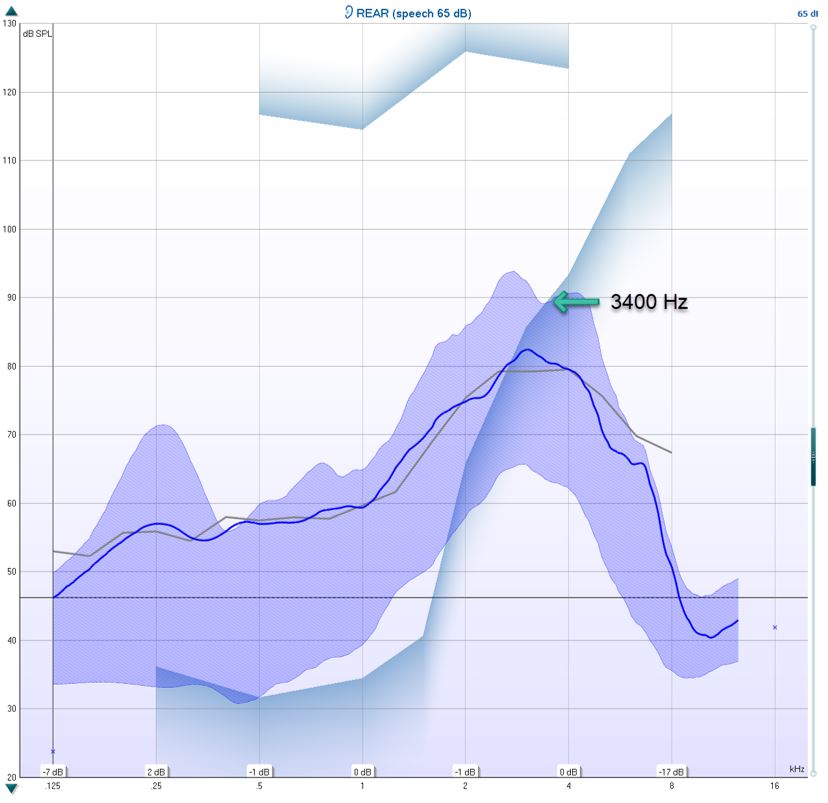
 

Figure 4: Calculated MAOF value.


8. Optional: hide target in the measurement settings (Figure 5).
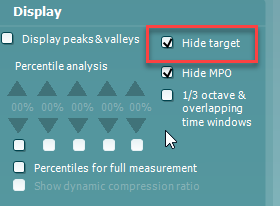
 

Figure 5: Hide target setting.


9. Measure the performance of the hearing aid with the frequency lowering feature off using the /ss/ stimulus (Figure 6).
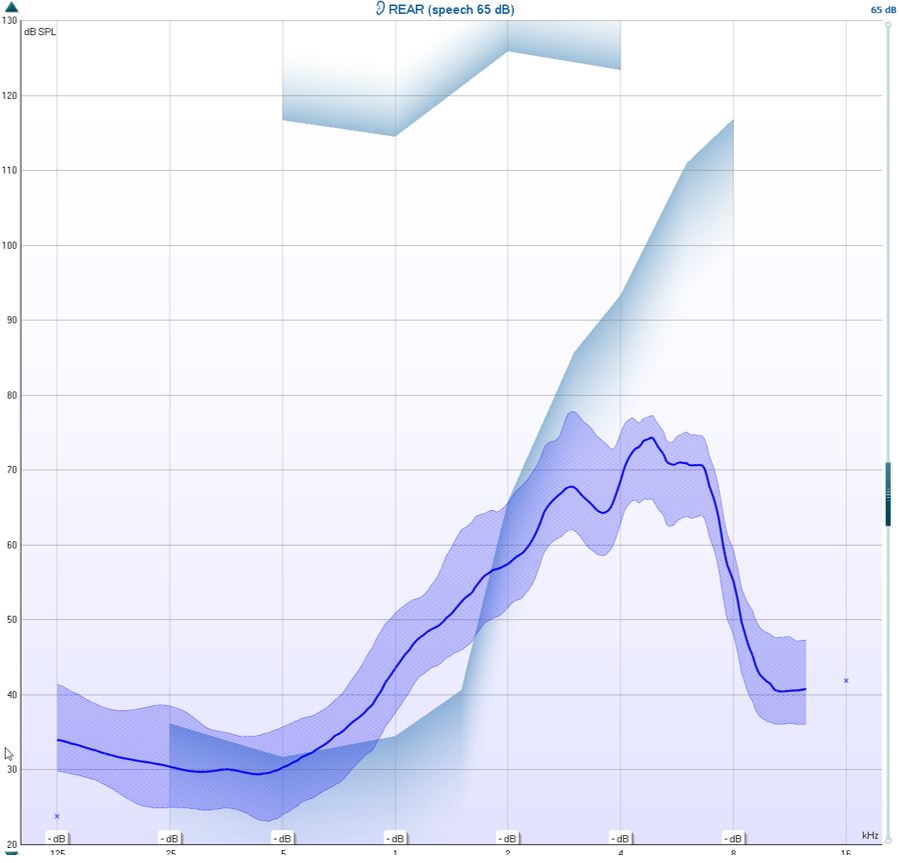
 

Figure 6: Hearing aid performance without frequency lowering.


10. Determine if the calibrated /ss/ stimulus is audible and falls within the MAOF range for an LTASS measured at 65 dB. If not, the candidacy criterion for frequency lowering has been met.


How to verify frequency lowering feature

1. Measure the performance of the hearing aids with frequency lowering feature on using the /SS/ stimulus (Figure 7).
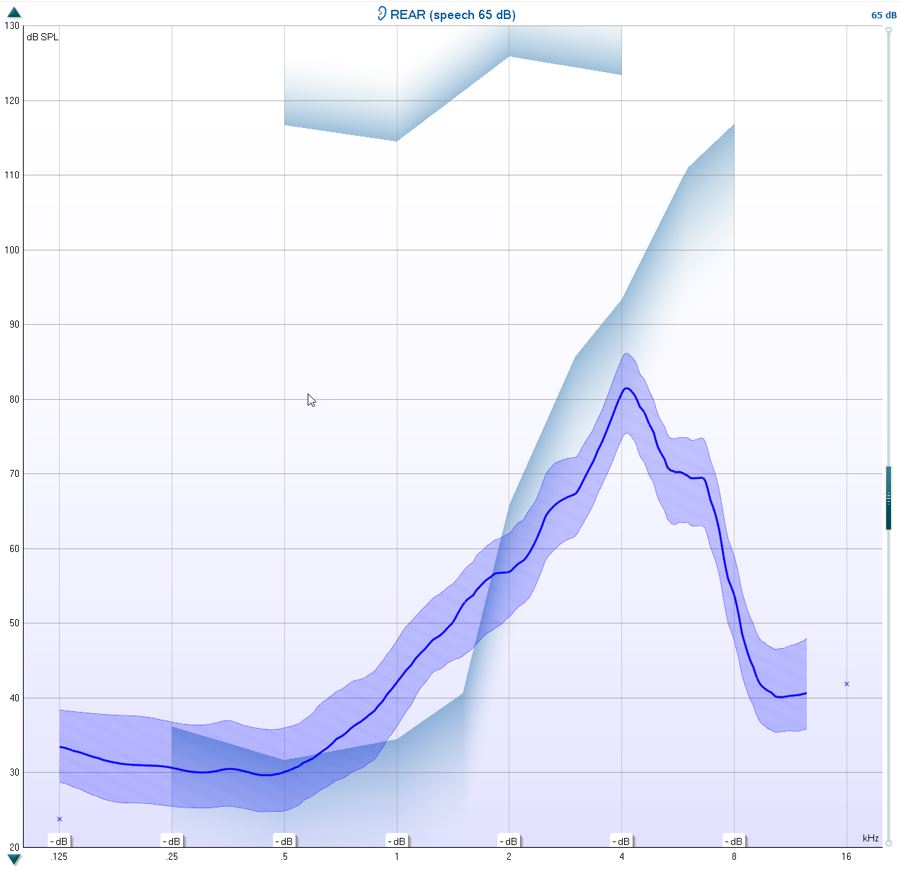
 

Figure 7: Hearing aid performance with frequency lowering.


2. Evaluate if it falls within the MAOF range at 65 dB SPL.

3. Fine-tune the frequency lowering so the /SS/ falls within the MAOF range (Figure 8).
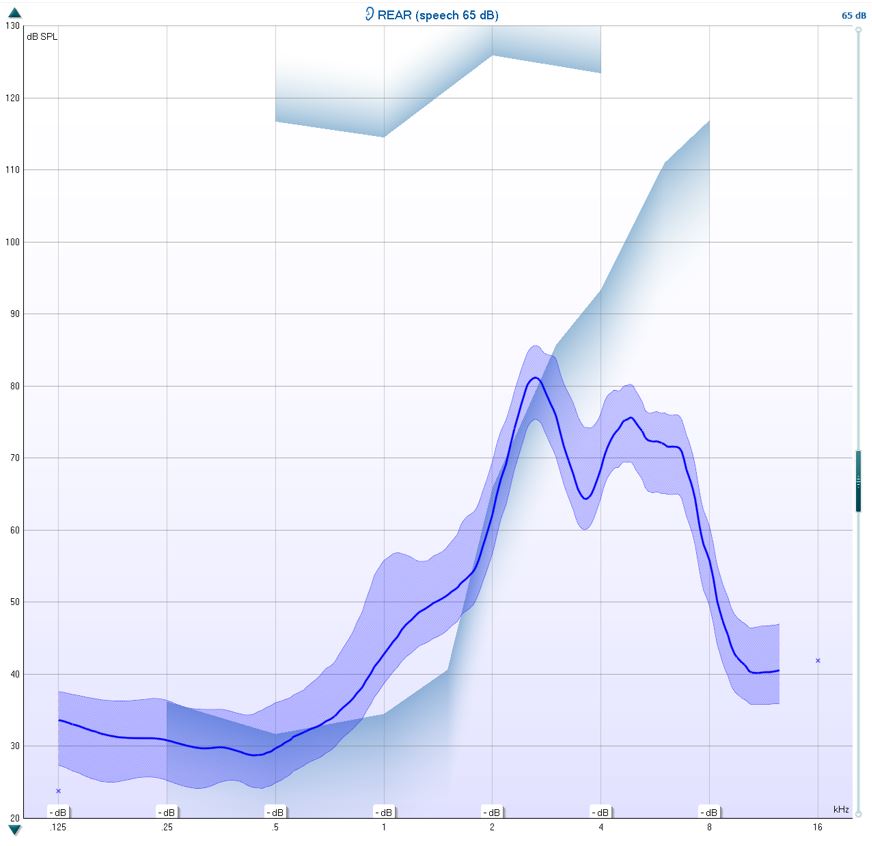
 

Figure 8: Fine-tuned frequency lowering.


4. You can choose to run the test with the /SH/ stimulus to check the patient's ability to differentiate between the /SS/ and the /SH/ stimuli.

5. It is also beneficial to run the /SS/ at 55 dB SPL to ensure the softer stimulation is audible.

Presenter

Interacoustics

Available Training

AC440 Protocol Setup

There are many different demands and wishes regarding how an audiometer should both function and appear depending on the specific situation and national standards. One of the greatest advantages of the AC440 module is the flexibility, enabling you to tailor the system according to your specific preferences in the so-called “test protocols”. This article describes basic functionality on how to work with the AC440 Protocols.

Interacoustics2026-10-02

Acceptable Noise Level (ANL) Test

Learn how to perform the acceptable noise level (ANL) test with the CallistoTM device.

Interacoustics2026-10-02

Adult Hearing Aid Verification

Learn how to verifiy hearing aids in adults with the CallistoTM device, using real ear measurements (REM).

Interacoustics2026-10-02

Basic Audiometry

Learn how to do basic audiometry with the CallistoTM device.

Interacoustics2026-10-02

Binaural Real Ear Measurements

Learn how to perform binaural real ear measurements (REM) with the CallistoTM.

Interacoustics2026-10-02

BKB-SIN speech-in-noise test

In this quick guide, you will learn how to use the BKB-SIN speech-in-noise test provided with the Interacoustics CallistoTM audiometer. Read more.

Interacoustics2026-10-02

How to perform CROS and BiCROS fitting

Learn how to fit CROS and BiCROS hearing aids with the CallistoTM device.

Interacoustics2026-10-02

Customized Printout Setup

Customized Printout Setup

Interacoustics2026-10-02

How to perform FM transparency verification

In this CallistoTM quick guide, you'll learn how to perform FM transparency verification. Read more.

Interacoustics2026-10-02

How to Verify Directional Hearing Aids

Learn how to verify directional hearing aids with the Callisto™ system, using real ear measurements (REM).

Interacoustics2026-10-02

Verifying Ear Level FM Systems

Verifying Ear Level FM Systems

Interacoustics2026-10-02

Print Reports

Learn how to create customized print templates for the Callisto™, which can be linked to individual protocols for quick printing.

Interacoustics2026-10-02

QuickSIN Test

Learn how to perform the quick speech in noise (QuickSIN) test with the CallistoTM device.

Interacoustics2026-10-02

Real-Ear-to-Coupler Difference

Learn how to measure the real-ear-to-coupler difference (RECD) with the CallistoTM device.

Interacoustics2026-10-02

Speech in Noise (SIN) Test

Learn how to perform the speech in noise (SIN) test with the CallistoTM device.

Interacoustics2026-10-02

Speech in Quiet (SIQ) Test

Learn how to perform the speech in quiet (SIQ) test with the CallistoTM device.

Interacoustics2026-10-02