How to set up your HTC Vive Focus Vision VR headset in the morning

By Cassie Anderson PT, DPT

This quick guide provides information on how to set up prior to your first patient session in the morning.

1. If you have a portable solution packed in a carry-on suitcase, you first need to set this up.

2. Turn on the computer and launch the VIVE business streaming app.

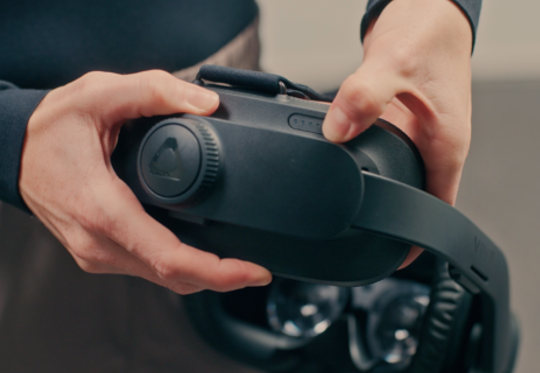
3. Turn on the headset by pressing and holding the button for 3 seconds.
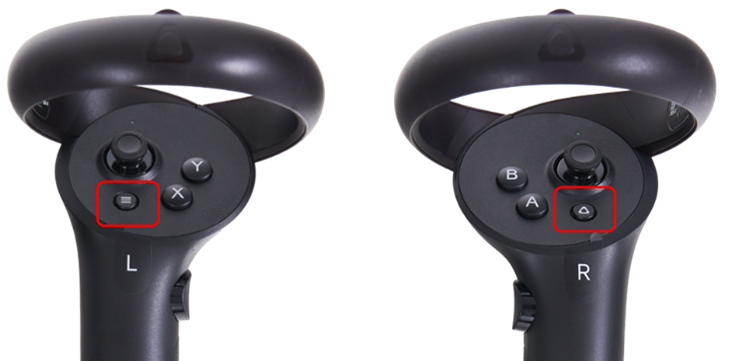
4. Turn on the hand controllers by pressing the menu buttons on both controllers.
If you are connecting wirelessly, the headset, router, and laptop must all be connected to the same Wi-Fi network. The router will display a solid red or blue light. A red light indicates that the router is functioning but does not have internet access. A blue light indicates that the router is connected to the internet. Note: Internet access is not required for the router to function.

When the connection between the laptop and headset is established, the three lines in the VIVE Business Streaming app will turn green.

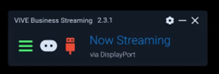
Wireless streaming option

Wired streaming option

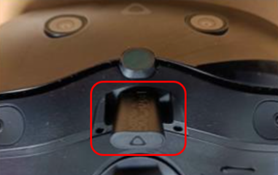
5. If you are using the trackers, insert the dongle in the headset below the nose.
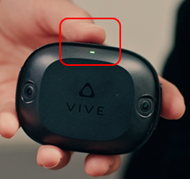
6. Turn on the trackers by pressing the top button for 1 second.
7. Put the headset on your head. The headset will automatically perform an IPD adjustment for clear vision.

8. If you have moved to a new location since the last time the Virtualis solution was used, the headset will automatically prompt you to complete the room boundary and tracker setup. If needed, refer to the separate quick guides for instructions on reconfiguring the room boundary and trackers.

9. Remove the VR headset.

10. Launch the Virtualis application, you are now ready for your first session.

11. At the end of the day, turn off your Virtualis system and the headset. To turn off the headset, push and hold the headset button for 3 seconds. Using a controller, select "Shut down".
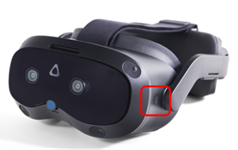
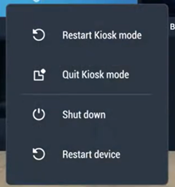
Using headset

Using controller

Presenter

Cassie Anderson PT, DPT

Cassie Anderson PT, DPT

Global Clinical Educator for Balance Rehabilitation, Interacoustics A/S Cassie holds her Doctorate in Physical Therapy and has served as a licensed physical therapist for 11 years. She began her career in the inpatient rehab setting working primarily with patients post stroke then transitioned to the outpatient setting working primarily with the vestibular/balance population in a multidisciplinary ENT and neurology clinics. Cassie has participated in research and quality improvement projects aimed at incorporating technology into clinical practice and has presented at both the national and international level.

Available Training

How to Perform the AirRaceVR Module

Learn how to perform the AirRaceVR module with the PhysioVR solution for comprehensive, virtual reality-based rehabilitation.

Cassie Anderson PT, DPT2026-10-02

How to perform the Cervical Range of Motion (ROM) assessment

Learn how perform the Cervical Range of Motion (ROM) assessment with the Virtualis PhysioVR system. Read more.

Cassie Anderson PT, DPT2026-10-02

How to perform the DVA Rehab module

Learn how to perform the DVA Rehab module with the Virtualis PhysioVR system. Read more.

Cassie Anderson PT, DPT2026-10-02

How to Perform the DVA Test Module

Learn how to perform the DVA Test module with the Virtualis PhysioVR rehabilitation device. Read more.

Cassie Anderson PT, DPT2026-10-02

How to Perform the Head-Eye Coordination Module

Learn how to perform the Head-Eye Coordination module with the PhysioVR solution for comprehensive, virtual reality-based rehabilitation.

Cassie Anderson PT, DPT2026-10-02

How to create a protocol

This quick guide provides information on creating a protocol under a patient profile in the Virtualis PhysioVR system.

Cassie Anderson PT, DPT2026-10-02

How to create a report

This quick guide provides information on viewing patient results, creating a patient report, and exporting the report to a PDF with the Virtualis PhysioVR.

Cassie Anderson PT, DPT2026-10-02

How to navigate the software modules

This quick guide provides information on how to view and navigate the software modules in the Virtualis PhysioVR system.

Cassie Anderson PT, DPT2026-10-02

How to perform a room setup

This quick guide provides information on how to complete a room setup in the SteamVR application for the HTC Vive Pro 2 VR headset. For use with the PhysioVR.

Cassie Anderson PT, DPT2026-10-02

How to perform SVV with the Virtualis BalanceVR and PhysioVR

In this video, you will learn how to perform Subjective Visual Vertical (SVV) testing with the Virtualis PhysioVR system. Watch the video here.

Interacoustics2026-10-02

How to set the patient up with the Virtualis VR headset and accessories

In this video, you will learn how to set the patient up with the Virtualis VR headset and accessories. For use with PhysioVR.

Interacoustics2026-10-02

How to set up profiles

This quick guide provides information on setting up practitioner and patient profiles and creating a prescriber in the Virtualis PhysioVR system. Read more.

Cassie Anderson PT, DPT2026-10-02

How to set up your patient with the Virtualis VR headset

Learn how to set up and use your Virtualis VR headset so you are ready to start testing your patient.

Interacoustics2026-10-02

How to set up your portable Virtualis solution

Learn what's included with your portable Virtualis system and how to set it up so you are ready for testing.

Interacoustics2026-10-02

How to swap the battery in your Virtualis VR headset

Learn how to swap the battery in your Virtualis VR headset and keep sessions flowing without interruption.

Interacoustics2026-10-02

How to update software modules

This quick guide provides information on how to update the software modules in the Virtualis PhysioVR system.

Cassie Anderson PT, DPT2026-10-02