
Cleaning the Probe Tip

By Interacoustics

Description

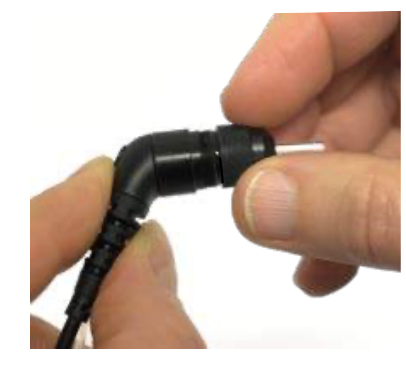
Step 1: Unscrew the probe cap and remove the probe tip.
Step 2: Thread the cleaning floss into one of the channels from the base of the probe tip. Pull the cleaning floss completely through the probe tip channel.

To clean the larger channel it is advisable to double the floss to clean the entire surface effectively.
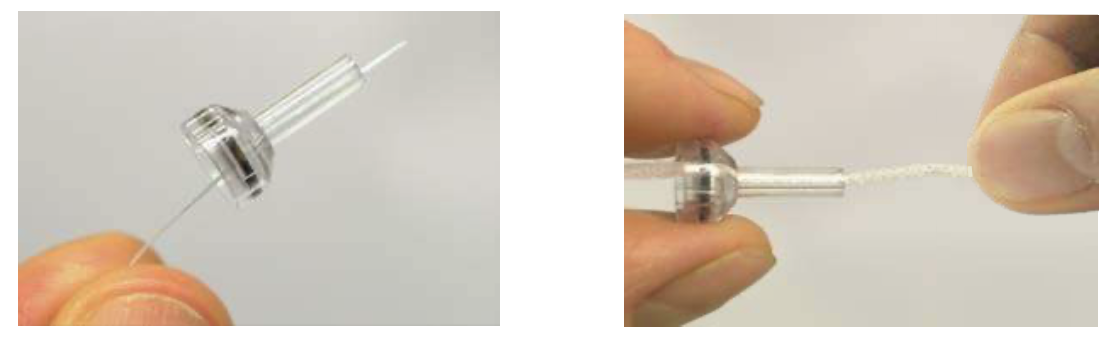
To access and clean the channel it is necessary to remove the gasket from inside the probe tip. You can do this using a fine pin. Push the gasket back into place after cleaning.

Clean each of the channels as needed. Discard floss after use.

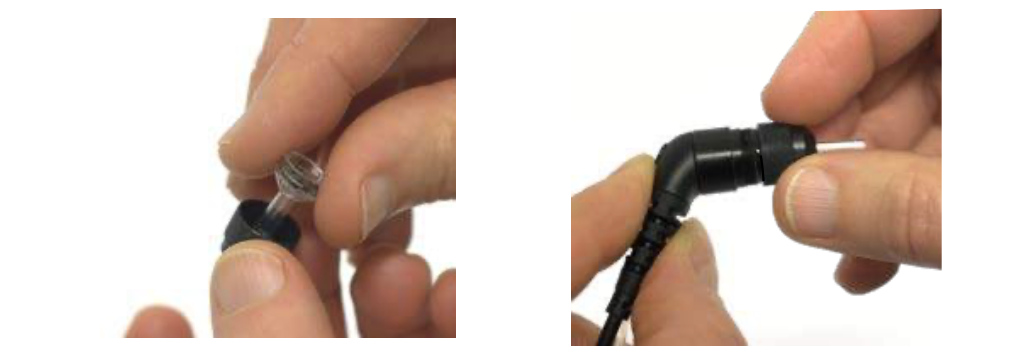
Step 3. Reattach the probe tip to the probe and screw the cap into place.

Notice:

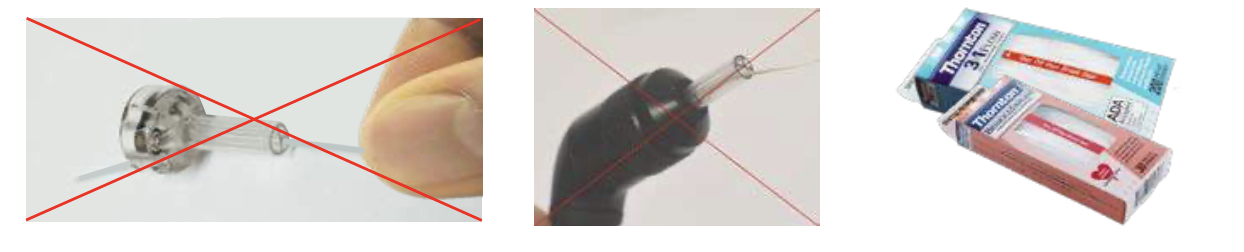
• DO NOT clean the probe tip while it is mounted on the probe.
• Only insert the cleaning floss or wire into the back of the probe tip to ensure wax/debris is pushed out of the probe tip instead of into it. This also protects the gasket from being damaged.
• DO NOT insert cleaning tools directly into the probe. This will damage sensitive components.
Presenter

Interacoustics

Available Training

Cleaning the Earphone for EarCups

Learn how to clean the earphone for earcups.

Interacoustics2026-10-02

Cleaning the Insert Earphone

Learn how to clean the insert earphone.

Interacoustics2026-10-02

Getting started with HearSIMTM

Learn how to use the HearSIMTM software.

Interacoustics2026-10-02

How to change other settings on your Sera™ device

Learn how to change other settings on your SeraTM device.

Interacoustics Academy2026-10-02

How to charge and carry the Sera™ device

Learn how to charge and carry the SeraTM device.

Interacoustics Academy2026-10-02

How to connect the Sera™ probe correctly

Learn how to connect the Sera™ probe correctly.

Interacoustics Academy2026-10-02

How to do a daily system and probe check of your Sera™ device

Learn how to do a daily system and probe check of your Sera™ device.

Interacoustics Academy2026-10-02

How to download results from the Sera™ device to a PC

Learn how to download results from the Sera™ device to a pc.

Interacoustics Academy2026-10-02

How to install the HearSIM™ database on a PC

Learn how to to install the HearSIM™ database on a PC.

Interacoustics Academy2026-10-02

How to install the printer for your Sera™ device

Learn how to to install the printer for your Sera™ device.

Interacoustics Academy2026-10-02

How to perform a hearing screening using the Sera™ device

Learn how to to perform a hearing screening test using the Sera™ device.

Interacoustics Academy2026-10-02

How to print tests from the Sera™ device

Learn how to to print tests from the Sera™ device.

Interacoustics Academy2026-10-02

How to set up the SeraTM device using HearSIM™

Learn how to to set up the Sera™ device using the HearSIM™ software.

Interacoustics Academy2026-10-02

SeraTM Automated ABR

Learn how to do automated auditory brainstem response (ABR) testing with the SeraTM hearing screening device.

Interacoustics2026-10-02

SeraTM Cart Assembly

Learn how to assemble the SeraTM Cart.

Interacoustics2026-10-02

How to perform DPOAE with SeraTM

Learn how to perform distortion product otoacoustic emission (DPOAE) testing with the SeraTM hearing screening device.

Interacoustics2026-10-02