
How to perform DPOAE on the Titan without using a PC

By Interacoustics

Prepare the equipment

  1. Turn on Titan by pressing the R or L button.
  2. Choose the test protocol from the list using the up & down arrow keys and then press Select.
  3. To use a different protocol than the one selected, press Protocol and then repeat step 2 above. 4. Select the ear for testing

Test environment

The ideal test environment is a quiet room. High ambient background noise adversely affects OAE measurements.

Prepare the baby

The baby should be sleeping or in quiet relaxed state. Sucking, blinking, crying or movement may affect testing.

Place transducer
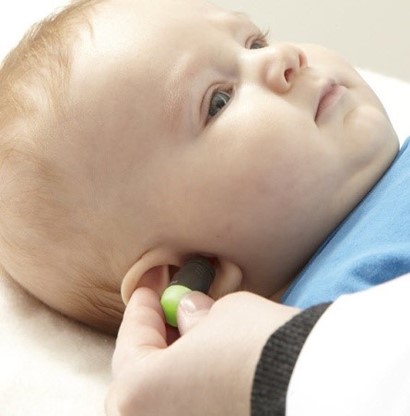

Place the probe in the ear - the light will turn green when a good seal is obtained.

Run test

Press the START button on the Titan or press the shoulder box button.

Results

PASS result REFER result
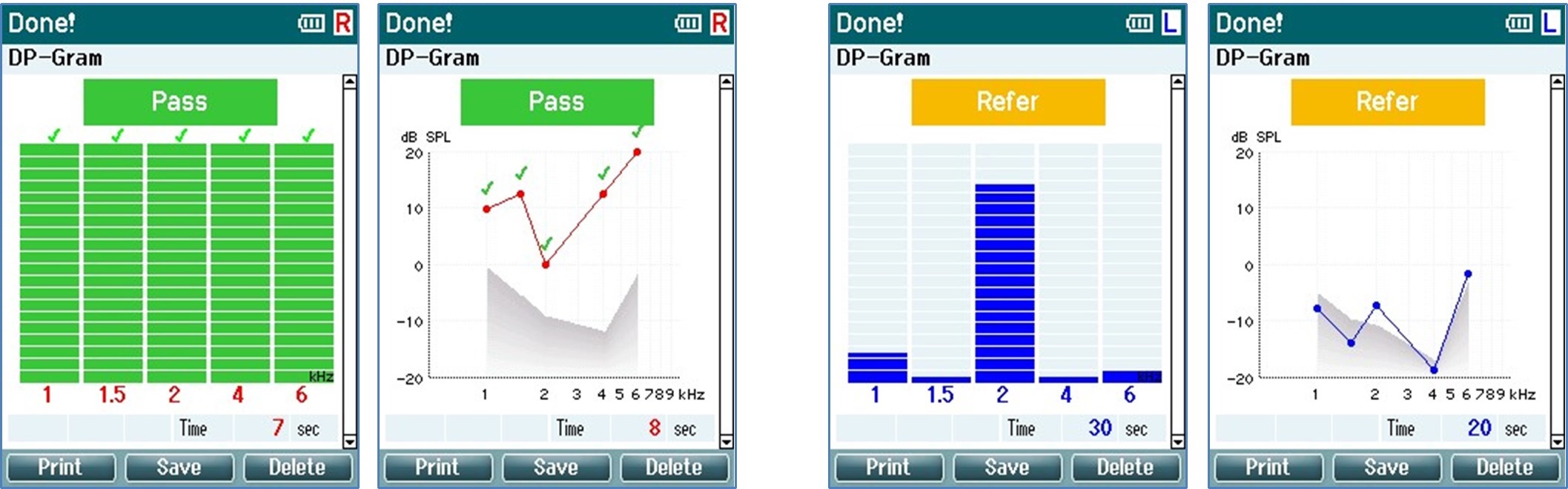
PASS - when the criteria for a pass are reached, PASS is displayed in green above the measurement. REFER - when the criteria for a pass are not reached within the measurement time, REFER is displayed in amber above the measurement.

INCOMPLETE - if the test is stopped before a PASS or REFER is generated by the system, INCOMPLETE is displayed above the measurement indicating that the full test was not completed.

Presenter

Interacoustics

Available Training

Creating an ABRIS Test Protocol

Learn how to use the Titan's automated ABR protocol.

Interacoustics2026-10-02

Acoustic Reflex Testing

Learn how to perform acoustic reflex testing with the Titan tympanometer.

Interacoustics2026-10-02

Best Practices for OAE Testing

Learn how to get the most out of your Titan for OAE testing.

Interacoustics2026-10-02

How to Identify a Blocked Probe Fit

Learn how to identify a blocked probe fit with the Titan tympanometer.

Interacoustics2026-10-02

How to Change the Probe Tip

Learn how to change the Titan's probe tip.

Interacoustics2026-10-02

How to Clean the Probe Tip

Learn how to clean the Titan's probe tip.

Interacoustics2026-10-02

Creating a DPOAE Pass/Refer Test Protocol

Learn how to create a DPOAE pass/refer test protocol with the Titan.

Interacoustics2026-10-02

Creating a TEOAE Pass/Refer Test Protocol

Learn how to create a TEOAE pass/refer test protocol with the Titan.

Interacoustics2026-10-02

Daily System Check

Learn how to perform a daily system check of your Titan.

Interacoustics2026-10-02

Electrode Tips & Tricks

Learn how to get the most out of your electrodes for testing with the Titan.

Interacoustics2026-10-02

How to Identify Fluid in the Middle Ear

Learn how to identify fluid in the middle ear with the Titan tympanometer.

Interacoustics2026-10-02

How to clean the Titan probe tube

In this video, you will learn how to clean the Titan's probe tube.

Interacoustics2026-10-02

How to print without a database

Click here to learn about the three options you have for printing without a database with the Titan handheld tympanometer.

Interacoustics2026-10-02

How to Identify a Loose Probe Fit

Learn how to identify a loose probe fit with the Titan tympanometer.

Interacoustics2026-10-02

Mastoid Electrode Montage

Learn how to prepare the patient's skin and apply mastoid electrodes for automated ABR testing with the Titan.

Interacoustics2026-10-02

How to Measure eSRT

Learn how to measure electrically evoked stapedial reflex thresholds (eSRTs) with the Titan.

Interacoustics2026-10-02