
Pure Tone Audiometry

By Interacoustics

What is pure tone audiometry?

Pure tone audiometry is a hearing test that establishes the hearing sensitivity at various frequencies for air conduction and bone conduction. The test can specify the air conduction and bone conduction loss and distinguish between abnormality in the conductive mechanism and sensor neural mechanism. Masking can be applied to both the air conduction and bone conduction threshold to establish pure tone thresholds.

Required equipment

  • Headphones or insert ihones
  • Bone oscillator
  • A response button

How to perform pure tone audiometry in Diagnostic Suite
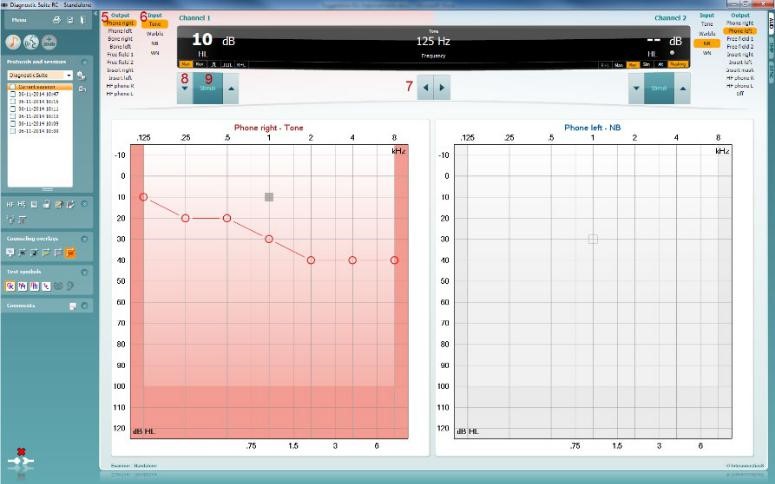
Pure tone audiometry software screen in Diagnostic suite, with an audiogram recorded for the right ear

1. Launch your PC-based audiometer controlled from the Diagnostic Suite as stand-alone or from NOAH or OtoAccess.

2. Click on the AUD tab on the upper right hand side of the screen.

3. Click on the icon to launch the tone audiometry screen, if Tone audiometry is not the default screen.

4. Select the desired Audiometry protocol from the Protocols and Sessions drop down list.
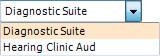
Drop down list with the following options: 1) Diagnostic Suite and 2) Hearing Clinic Aud

5. Choose the transducer type and stimulus type, if not already predefined from the Protocol Setup.

6. The Frequency range can be operated from the PC keyboard with the mouse or from the audiometer:

  • Audiometer: Frequency Down/Up
  • PC Keyboard: Right/left arrow keys
  • Mouse mode: Left/Right arrow buttons

7. Choose the intensity

  • Audiometer: Use the Right wheel
  • With PC keyboard: Use the up/down arrow keys
  • Mouse mode: Up/Down arrow buttons

8. Presenting the stimuli:

  • Audiometer: Use the Tone Switch
  • PC Keyboard: Press on the space bar or left Ctrl button
  • Mouse mode: Hover the mouse over the Stimuli button

9. If masking is necessary:

  • Turn on masking in Channel 2 by ensuring that the desired transducer is selected for non-test ear
  • Ensure that the word Masking is highlighted in orange
  • Choose Rev to present the masking noise continuously
  • It is also possible to turn on Auto masking or Masking help

It is possible to define the output of channels for each protocol from the protocol settings.

Presenter

Interacoustics

Available Training

How to install and use Diagnostic Suite with your AS608

In this video, you'll learn how to install and use Diagnostic Suite with your AS608. Watch the video here.

Interacoustics2026-10-02

Diagnostic Suite: How to create a print template

In this video, you'll learn how to create a print template with Diagnostic Suite. Watch the video here.

Interacoustics2026-10-02

Diagnostic Suite: How to share a print layout design

In this video, you'll learn how to share a print layout design with Diagnostic Suite. Watch the video here.

Interacoustics2026-10-02

High Frequency Audiometry

Learn how to perform high frequency audiometry with in the Diagnostic Suite software.

Interacoustics2026-10-02

Masking Level Difference (MLD)

Learn how to measure the masking level difference (MLD) in the Diagnostic Suite software, including results interpretation.

Interacoustics2026-10-02

Pediatric Noise

Learn about the pediatric noise stimulus, which is available with in the Diagnostic Suite software.

Interacoustics2026-10-02

Quick Speech in Noise (QuickSIN)

Learn how to perform the quick speech in noise (QuickSIN) test in the Diagnostic Suite software, including results interpretation.

Interacoustics2026-10-02

Short Increment Sensitivity Index

Learn how to perform the short increment sensitivity index (SISI) test in the Diagnostic Suite software.

Interacoustics2026-10-02

Speech Audiometry

Learn how to perform speech audiometry in the Diagnostic Suite software, including results interpretation.

Interacoustics2026-10-02

Threshold Equalizing Noise (TEN) Test

Learn how to perform the threshold equalizing noise (TEN) test in the Diagnostic Suite software, including results interpretation.

Interacoustics2026-10-02

Tone Decay Test

Learn how to perform the tone decay test in the Diagnostic Suite software.

Interacoustics2026-10-02

Weber Test

Learn how to perform the Weber test in the Diagnostic Suite software, including results interpretation.

Interacoustics2026-10-02