Weber Test

By Interacoustics

What is the Weber test?

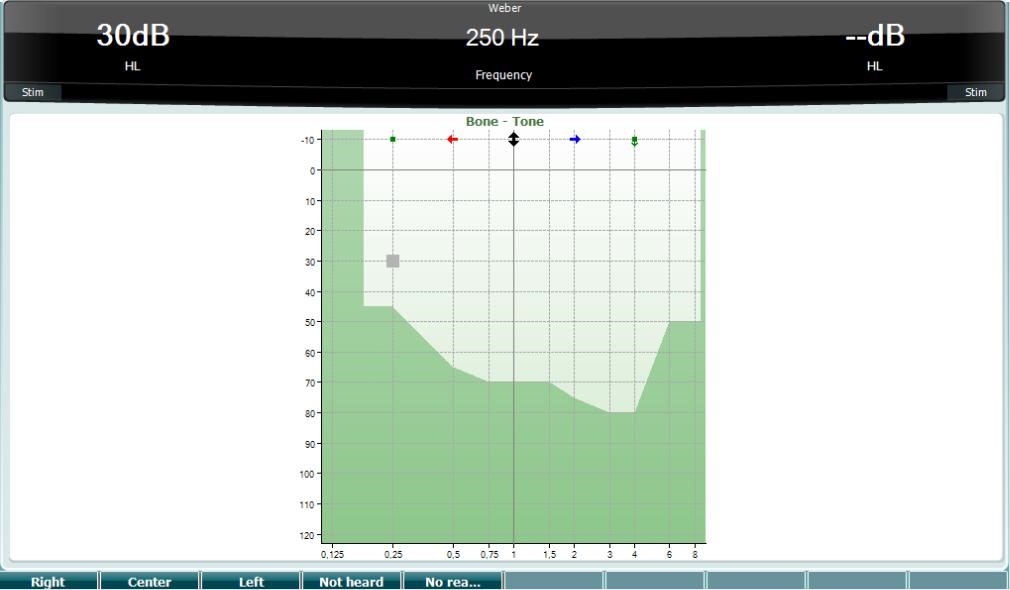
The Weber test distinguishes between conductive and sensor neural hearing loss through use of a bone conductor. Use the indications to show where the tone is perceived.

Required equipment

  • An AC40, AD629 or an AA222 hardware
  • A bone conductor

Weber test procedure

Weber test screen in Diagnostic Suite

  1. Press Tests - Weber to enter the Weber test screen.
  2. Place the bone conductor on the forehead of the patients and instruct them to tell you if the tones presented are heard better to the Right, Left, Centre or Not heard at all.
  3. Present a tone at a level of 10 dB above the worst BC. You can select whether you want a tone or Warble stimulus pressing the hardkey Tone/Warble on the device.
  4. Await response from the patient and click on the corresponding soft button.

Available responses: Perceived right, perceived center, perceived left, not heard, and no reaction

Weber test results

If the patient hears the tone better in the poorer ear, the hearing loss is conductive. If the tone is heard better in the better ear, the hearing loss is sensor neural at the given frequency.

Presenter

Interacoustics

Available Training

How to install and use Diagnostic Suite with your AS608

In this video, you'll learn how to install and use Diagnostic Suite with your AS608. Watch the video here.

Interacoustics2026-10-02

Diagnostic Suite: How to create a print template

In this video, you'll learn how to create a print template with Diagnostic Suite. Watch the video here.

Interacoustics2026-10-02

Diagnostic Suite: How to share a print layout design

In this video, you'll learn how to share a print layout design with Diagnostic Suite. Watch the video here.

Interacoustics2026-10-02

Short Increment Sensitivity Index

Learn how to perform the short increment sensitivity index (SISI) test in the Diagnostic Suite software.

Interacoustics2026-10-02

High Frequency Audiometry

Learn how to perform high frequency audiometry with in the Diagnostic Suite software.

Interacoustics2026-10-02

Tone Decay Test

Learn how to perform the tone decay test in the Diagnostic Suite software.

Interacoustics2026-10-02

Pediatric Noise

Learn about the pediatric noise stimulus, which is available with in the Diagnostic Suite software.

Interacoustics2026-10-02

Speech Audiometry

Learn how to perform speech audiometry in the Diagnostic Suite software, including results interpretation.

Interacoustics2026-10-02

Pure Tone Audiometry

Learn how to perform pure tone audiometry in the Diagnostic Suite software.

Interacoustics2026-10-02

Quick Speech in Noise (QuickSIN)

Learn how to perform the quick speech in noise (QuickSIN) test in the Diagnostic Suite software, including results interpretation.

Interacoustics2026-10-02

Threshold Equalizing Noise (TEN) Test

Learn how to perform the threshold equalizing noise (TEN) test in the Diagnostic Suite software, including results interpretation.

Interacoustics2026-10-02

Masking Level Difference (MLD)

Learn how to measure the masking level difference (MLD) in the Diagnostic Suite software, including results interpretation.

Interacoustics2026-10-02

Looking for clinical training?

Are you looking for more advanced and clinical training?