
Daily System Check
Why should I perform a daily system check/probe integrity test?
It is recommended to perform a daily check of your OAE equipment to ensure that it is in good working order, before testing on patients. As the probe and probe tip often come into contact with wax or other debris in the ear canal, a common fault affecting testing can be a blocked or partially obstructed probe tip. Running a probe integrity test and a real-ear check allows for any probe faults or system distortions that can masquerade as biological responses to be detected. A daily check ensures that you can be certain that the results obtained throughout the day are valid.
Probe integrity test
The probe integrity test ensures artifact responses (system distortions) are not being generated by the probe or hardware. The probe tip should be inspected for wax or debris prior to conducting the test. Testing should always be conducted in a quiet environment.
Test procedure
- Insert the probe into the provided test cavity or ear simulator. It's important to use the correct-sized cavity for valid test results. Depending on the test cavity, an ear tip may need to be attached to the probe tip first.
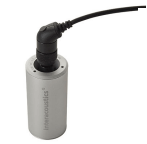
For DPOAE a 0.2cc cavity is recommended.
For TEOAE, a 0.5cc cavity is recommended.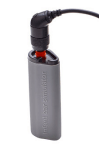
The infant ear simulator is specifically designed for assessing the probe with SeraTM - Select an OAE test protocol. As system distortion is dependent on stimulus output level, select a protocol that reflects what is used most often in clinical practice.
- Start the test and allow it to run until the test stops automatically. Do not stop the test manually
Test results
If the probe is functioning correctly, none of the frequency bands (TEOAE) or points (DPOAE) should have a checkmark, i.e., no artifacts/OAEs should be detected above the noise floor.
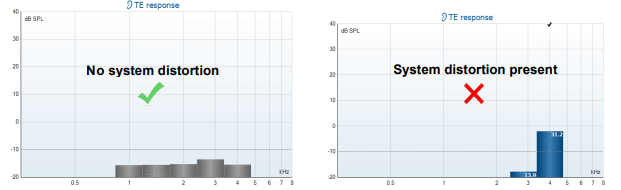
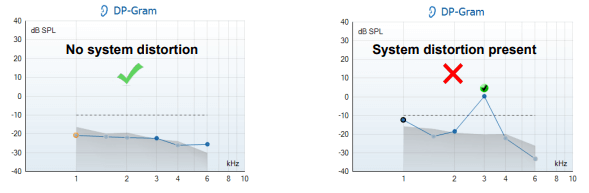
If an error message appears during testing or if one or more of the OAE bands or points has a checkmark (meaning detected), the probe integrity test has failed. This could indicate that:
- There is wax or debris in the probe tip and cleaning is required.
- The probe was not placed in the test cavity or ear simulator correctly, or,
- The probe's calibration needs to be checked.
Check and clean the probe tip and retry the test. If the probe test fails a second time, the probe should not be used to test on patients. Contact your local service technician for assistance.
Real-Ear Check
This test can be done by placing the probe in one's own ear and running a commonly used test protocol.
If OAE results do not match the tester's expected OAE result, this could be an indication that:
- The probe is not connected correctly to the device.
- The ear tip is not attached correctly to the probe tip.
- There is wax or debris in the probe tip and cleaning is
required. - The environment is too noisy for testing.
- The probe was not placed correctly in the ear canal.
- The probe's calibration needs to be checked.
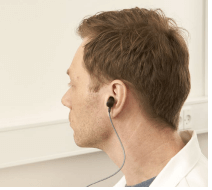
If results from the real-ear test do not match the expected result after checking items 1 to 5 above, the probe should not be used to test on patients. Contact your local service technician for assistance
Presenter
