
How to create a report

By Cassie Anderson PT, DPT

This quick guide provides information on viewing patient results, creating a patient report, and exporting the report to a PDF. To view more detailed information, please reference the Patient Manager 3.0 User Manual.

Viewing patient results

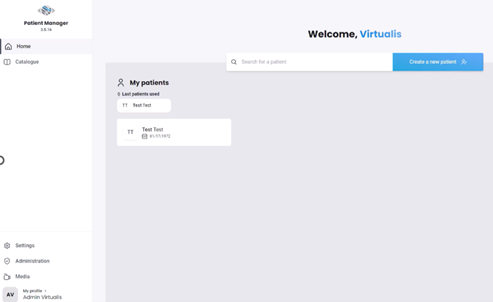
Open the Virtualis application, and you will arrive at the home page.
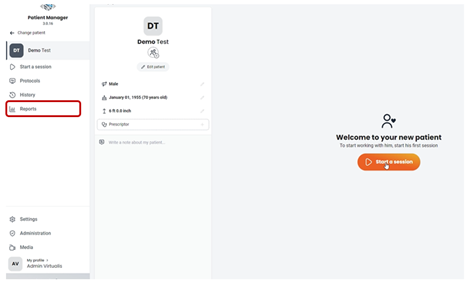
Select "Reports" on the left side of the screen.
Start by selecting the software module, then choose one or more sessions to view the results.
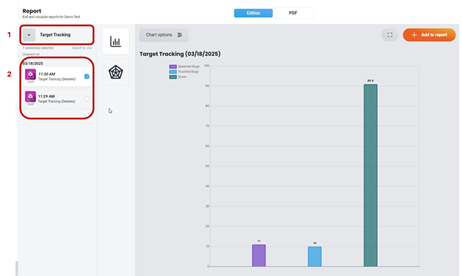
(1) Module choice and (2) session choice.

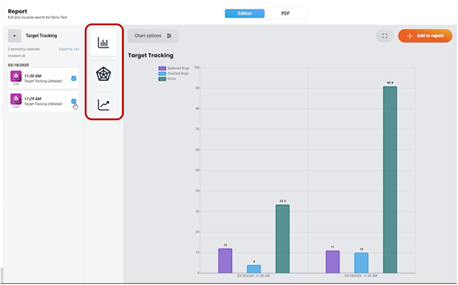
Change the graph type to display the results in a different format. The available graph options will vary based on the selected software module and the number of sessions.
Creating a patient report

Select the intended graph and click on the "+ Add to report" button in the upper right corner.
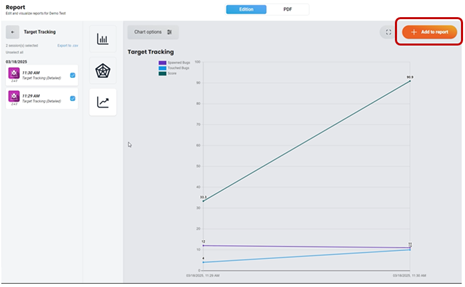
A number will appear on the PDF tab, indicating that the software module results have been added to the patient report.
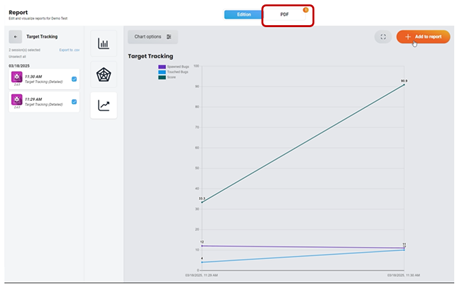
Continue to add patient results to the report by following the above steps. Once you have finished adding results to the report, view the report by clicking on the PDF tab.
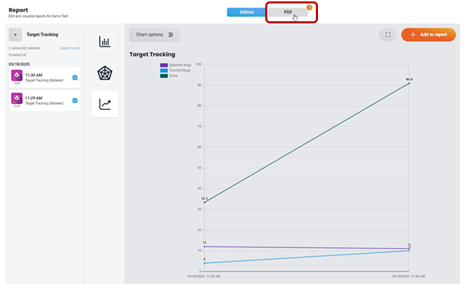
Exporting the patient report to a PDF

The PDF tab is divided into three sections:
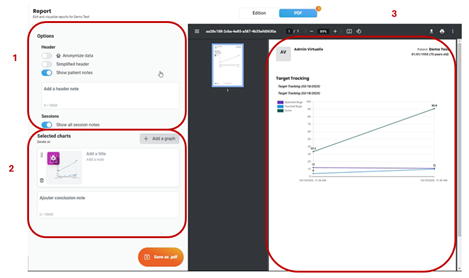
(1) PDF parameters, (2) Selected software modules and sessions, and (3) PDF print preview.

Select the parameters for your PDF. As you make selections, you will see real time changes to the PDF print preview.
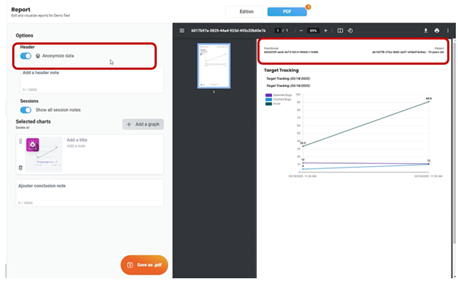
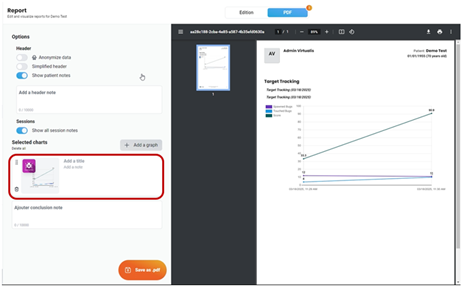
Organize the software module results by clicking and dragging the intended module.
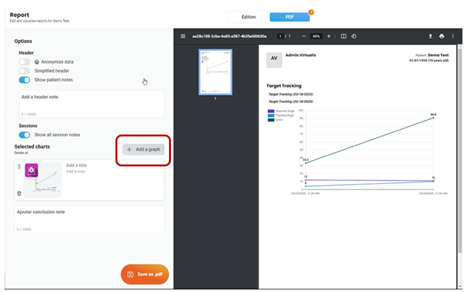
You can also add additional software module results directly to the PDF by clicking "+ Add a graph".
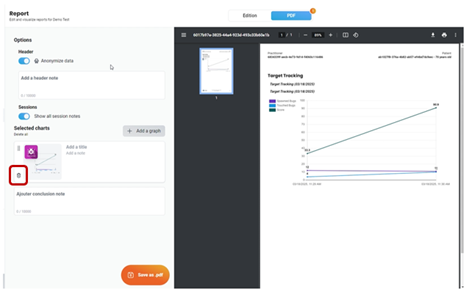
To remove a graph from the PDF, click on the trash can icon.
Once the report is created, you can save, download and/or print the PDF.
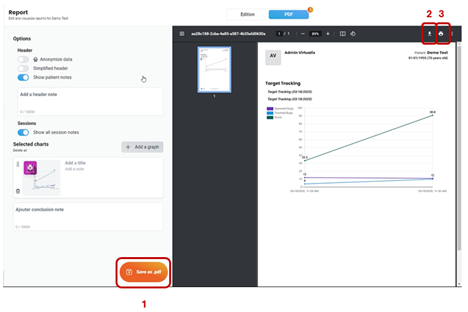
(1) Save PDF, (2) Download PDF, and (3) Print PDF.

Presenter

Cassie Anderson PT, DPT

Cassie Anderson PT, DPT

Global Clinical Educator for Balance Rehabilitation, Interacoustics A/S Cassie holds her Doctorate in Physical Therapy and has served as a licensed physical therapist for 11 years. She began her career in the inpatient rehab setting working primarily with patients post stroke then transitioned to the outpatient setting working primarily with the vestibular/balance population in a multidisciplinary ENT and neurology clinics. Cassie has participated in research and quality improvement projects aimed at incorporating technology into clinical practice and has presented at both the national and international level.

Available Training

How to Perform the BirdVR Module

Learn how to perform the BirdVR module with the Virtualis StaticVR force plates. Read more.

Cassie Anderson PT, DPT2026-10-02

How to set up your HTC Vive Focus Vision VR headset in the morning

Learn how to set up your HTC Vive Focus Vision VR headset in the morning, used alongside the Virtualis StaticVR balance force plates. Read more.

Cassie Anderson PT, DPT2026-10-02

How to create a protocol

This quick guide provides information on creating a protocol under a patient profile in the Virtualis StaticVR system.

Cassie Anderson PT, DPT2026-10-02

How to navigate the software modules

This quick guide provides information on how to view and navigate the software modules in the Virtualis StaticVR system.

Cassie Anderson PT, DPT2026-10-02

How to perform a room setup

This quick guide provides information on how to complete a room setup in the SteamVR application for the HTC Vive Pro 2 VR headset. For use with the StaticVR.

Cassie Anderson PT, DPT2026-10-02

How to perform the CTSIB test with Virtualis StaticVR

In this video, you will learn how to perform the Clinical Test of Sensory Interaction on Balance (CTSIB) test with the Virtualis StaticVR force plates.

Interacoustics2026-10-02

How to perform the Limits of Stability (LoS) Test on Virtualis MotionVR and StaticVR

In this video, you will learn how to perform the Limits of Stability (LoS) Test using the StaticVR static posturography force plates. Watch the video here.

Interacoustics2026-10-02

How to set up StaticVR and prepare for testing

Learn how to set up the StaticVR software and static posturography force plates and prepare for testing. Read more.

Interacoustics2026-10-02

How to set the patient up with the Virtualis VR headset and accessories

In this video, you will learn how to set the patient up with the Virtualis VR headset and accessories. For use with StaticVR.

Interacoustics2026-10-02

How to set up profiles

This quick guide provides information on setting up practitioner and patient profiles and creating a prescriber in the Virtualis StaticVR system. Read more.

Cassie Anderson PT, DPT2026-10-02

How to set up your patient with the Virtualis VR headset

Learn how to set up and use your Virtualis VR headset so you are ready to start testing your patient.

Interacoustics2026-10-02

How to set up your portable Virtualis solution

Learn how to set up your portable Virtualis solution and what's included with your system.

Interacoustics2026-10-02

How to swap the battery in your Virtualis VR headset

Learn how to swap the battery in your Virtualis VR headset and keep sessions flowing without interruption.

Interacoustics2026-10-02

How to update software modules

This quick guide provides information on how to update the software modules in the Virtualis StaticVR system.

Cassie Anderson PT, DPT2026-10-02

How to Perform the LOS Rehab Module

Learn how to perform the LOS Rehab module with the StaticVR force plates.

Cassie Anderson PT, DPT2026-10-02

How to Perform the MatchingVR Module

Learn how to perform the MatchingVR module with the StaticVR force plates.

Cassie Anderson PT, DPT2026-10-02