
How to switch between streaming modes on the HTC Focus Vision VR headset

By Cassie Anderson PT, DPT

This quick guide provides information on how to switch between the wireless and wired streaming modes on the HTC Vive Focus Vision VR headset.

Switching from wireless to wired streaming

1. Ensure the VIVE wired streaming kit is connected to the computer.

2. Connect the wired streaming cable to the USB-C port on the right side of the VR headset with the cable oriented upwards.
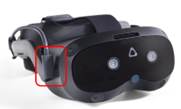
3. Fasten both hook-and-loop cable wraps behind the built-in speaker. Make sure to fasten them with the fuzzy side out to avoid tangling with hair.
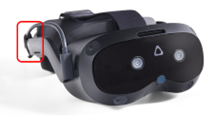
4. Inside the VR headset, a new window will appear. With a controller, select "VIVE Streaming (DP mode)" in the headset.

5. You will then enter the Virtualis home screen. You can now remove the VR headset.

6. On the computer, the USB icon on the VIVE Business Streaming Application will turn red.
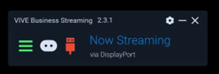
7. Launch the Virtualis application.

Switching from wired to wireless streaming

1. Remove the hook-and-loop cable wraps from the side of the VR headset.

2. Disconnect the wired streaming cable from the USB-C port on the right side of the VR headset.

3. Inside the VR headset, a window will appear. Using a controller, select "OK."

4. Another window will appear. Using a controller, select "VBS server" from the list.

5. You will then enter the Virtualis home screen. You can now remove the VR headset.

6. On the computer, the USB icon will change to a white Wi-Fi icon.

7. Launch the Virtualis application.

Presenter

Cassie Anderson PT, DPT

Cassie Anderson PT, DPT

Global Clinical Educator for Balance Rehabilitation, Interacoustics A/S Cassie holds her Doctorate in Physical Therapy and has served as a licensed physical therapist for 11 years. She began her career in the inpatient rehab setting working primarily with patients post stroke then transitioned to the outpatient setting working primarily with the vestibular/balance population in a multidisciplinary ENT and neurology clinics. Cassie has participated in research and quality improvement projects aimed at incorporating technology into clinical practice and has presented at both the national and international level.

Available Training

How to Perform the BirdVR Module

Learn how to perform the BirdVR module with the Virtualis StaticVR force plates. Read more.

Cassie Anderson PT, DPT2026-10-02

How to set up your HTC Vive Focus Vision VR headset in the morning

Learn how to set up your HTC Vive Focus Vision VR headset in the morning, used alongside the Virtualis StaticVR balance force plates. Read more.

Cassie Anderson PT, DPT2026-10-02

How to create a protocol

This quick guide provides information on creating a protocol under a patient profile in the Virtualis StaticVR system.

Cassie Anderson PT, DPT2026-10-02

How to create a report

This quick guide provides information on viewing patient results, creating a patient report, and exporting the report to a PDF with the Virtualis StaticVR.

Cassie Anderson PT, DPT2026-10-02

How to navigate the software modules

This quick guide provides information on how to view and navigate the software modules in the Virtualis StaticVR system.

Cassie Anderson PT, DPT2026-10-02

How to perform a room setup

This quick guide provides information on how to complete a room setup in the SteamVR application for the HTC Vive Pro 2 VR headset. For use with the StaticVR.

Cassie Anderson PT, DPT2026-10-02

How to perform the CTSIB test with Virtualis StaticVR

In this video, you will learn how to perform the Clinical Test of Sensory Interaction on Balance (CTSIB) test with the Virtualis StaticVR force plates.

Interacoustics2026-10-02

How to perform the Limits of Stability (LoS) Test on Virtualis MotionVR and StaticVR

In this video, you will learn how to perform the Limits of Stability (LoS) Test using the StaticVR static posturography force plates. Watch the video here.

Interacoustics2026-10-02

How to set up StaticVR and prepare for testing

Learn how to set up the StaticVR software and static posturography force plates and prepare for testing. Read more.

Interacoustics2026-10-02

How to set the patient up with the Virtualis VR headset and accessories

In this video, you will learn how to set the patient up with the Virtualis VR headset and accessories. For use with StaticVR.

Interacoustics2026-10-02

How to set up profiles

This quick guide provides information on setting up practitioner and patient profiles and creating a prescriber in the Virtualis StaticVR system. Read more.

Cassie Anderson PT, DPT2026-10-02

How to set up your patient with the Virtualis VR headset

Learn how to set up and use your Virtualis VR headset so you are ready to start testing your patient.

Interacoustics2026-10-02

How to set up your portable Virtualis solution

Learn how to set up your portable Virtualis solution and what's included with your system.

Interacoustics2026-10-02

How to swap the battery in your Virtualis VR headset

Learn how to swap the battery in your Virtualis VR headset and keep sessions flowing without interruption.

Interacoustics2026-10-02

How to update software modules

This quick guide provides information on how to update the software modules in the Virtualis StaticVR system.

Cassie Anderson PT, DPT2026-10-02

How to Perform the LOS Rehab Module

Learn how to perform the LOS Rehab module with the StaticVR force plates.

Cassie Anderson PT, DPT2026-10-02