Short Increment Sensitivity Index

By Interacoustics

What is the short increment sensitivity index (SISI) test?

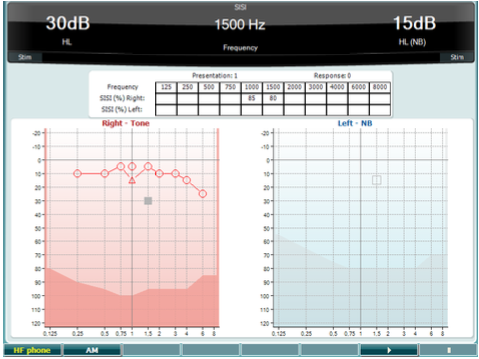
The short increment sensitivity index (SISI) test measures the ability to recognise 1dB increases in intensity during a series of bursts of pure tones presented 20dB above the pure tone threshold for the test frequency. It can be used to differentiate between cochlear and retro cochlear disorders, as a patient with a cochlear disorder will be able to perceive the increments of 1dB, whereas a patient with a retro cochlear disorder will not.

Required equipment

  • Headphones or insert phones
  • A response button

SISI test procedure

  1. Press and hold the Tests button and select SISI: Short increment sensitivity index using the scroll wheel on the audiometer.
  2. Select Tone or Warble in channel 1. If cross hearing is suspected, masking should be presented in channel 2.
  3. Select the desired test frequency and set the input level 20dB above threshold using the scroll wheel on the audiometer.
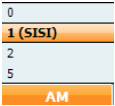
  4. In the most common type of SISI test, the incremental steps are set to 1dB. By pressing and holding the function button AM, it is possible to change the increments. Prior to presenting the actual test of 1dB increments, a trial of 2 or 5dB steps can be employed to ensure that the patient understands the test procedure and what will be required. If you are uncertain about the responses from the patient, 0dB can be used.
  5. Explain to the patient that they will now hear a series of tones. If suddenly there is a change in the loudness of the presentation of the tone, the response button should be pushed.
  6. Start the test by pressing . The system will automatically count the number of reactions from the patient. Note that the system needs 20 presentations to calculate a SISI score.
  7. Repeat the test for all desired test frequencies.
  8. Press to end the test.
  9. Save the SISI test by clicking Save Session.

SISI test results

The SISI test should be conducted at 20dB SL for all frequencies tested. If the patient gets a high score on the SISI test, this could be indicative of retro cochlear damage.

Presenter

Interacoustics

Available Training

Accessing Saved Client Records

Learn how to access saved client records with the AC40 clinical audiometer.

Interacoustics2026-10-02

Alternate Binaural Loudness Balance Test

Learn how to perform the alternate binaural loudness balance (ABLB) test with the AC40 clinical audiometer, including results interpretation.

Interacoustics2026-10-02

Audiometer Overview

This video provides an overview of the AC40 clinical audiometer.

Interacoustics2026-10-02

Audiometric Masking

Learn how to perform audiometric masking with the AC40 clinical audiometer.

Interacoustics2026-10-02

Békésy Audiometry

Learn how to perform the Békésy audiometry test with the AC40 clinical audiometer, including the Békésy audiometry types for results interpretation. Learn more.

Interacoustics2026-10-02

BKB-SIN speech-in-noise test

In this quick guide, you will learn how to use the BKB-SIN speech-in-noise test provided with the Interacoustics AC40 clinical audiometer. Read more.

Interacoustics2026-10-02

Common Settings

Learn how to access and edit common settings with the AC40 clinical audiometer.

Interacoustics2026-10-02

High Frequency Audiometry

Learn how to perform high frequency audiometry with the AC40 clinical audiometer.

Interacoustics2026-10-02

How to Adjust Monitor Settings

Learn how to adjust monitor settings with the AC40 clinical audiometer.

Interacoustics2026-10-02

How to print without a database

Click here to learn about the three options you have for printing without a database with the AC40 clinical audiometer.

Interacoustics2026-10-02

Hughson-Westlake Procedure

Learn how to perform the Hughson-Westlake procedure with the AC40 clinical audiometer.

Interacoustics2026-10-02

Keyboard Buttons

This video provides an overview of the AC40 clinical audiometer's keyboard buttons.

Interacoustics2026-10-02

LCD Display Overview

This video provides an overview of the AC40 clinical audiometer's LCD display.

Interacoustics2026-10-02

Load User Settings

Learn how to load user settings with the AC40 clinical audiometer.

Interacoustics2026-10-02

Masking Level Difference (MLD)

Learn how to measure the masking level difference (MLD) with the AC40 clinical audiometer, including results interpretation.

Interacoustics2026-10-02

Pediatric Noise

Learn about the pediatric noise stimulus, which is available with the AC40 clinical audiometer.

Interacoustics2026-10-02