
Tone Decay Test

By Interacoustics

What is the tone decay test?

The tone decay test can help to identify the adaptation of the auditory system (Carhart, 1957). It involves measuring the perceptual reduction in a continuous tone over time. This can indicate towards a cochlear or neural cause of deafness.

The test involves looking at the patient's response to the onset of a supra-threshold sound and then their continuous response to this as it continues over time. For example, in Meniere's disease this is detected correctly on onset but rapidly deteriorates due to dysfunctional hair cells (Carhart, 1957). A normal response should be maintained for a minute of stimulation. Should a patient not be able to maintain this, the stimulus intensity is increased until a minute is achieved. This is only increased up to a maximum 30dB supra- threshold.

Required equipment

  • The AC40 hardware
  • Calibrated headphones or insert phones
  • Patient response button

Tone decay test procedure

The tone decay test can be run on the AC40 as standalone or by using the AC40 with Diagnostic Suite.
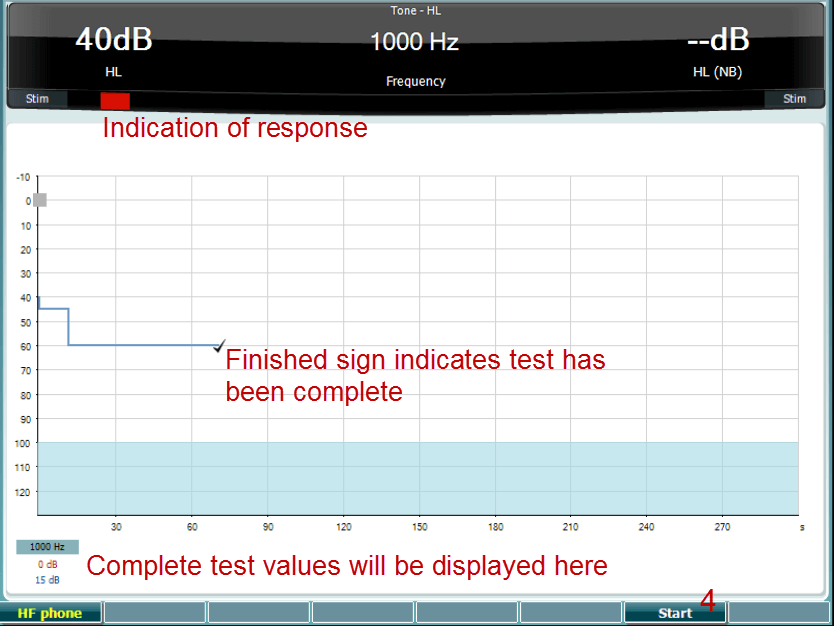
  1. The patient's audiometry is obtained.
  2. Press the Tests button and select Tone decay from the list of test by rotating the wheel. The patient is then instructed to continuously respond to the tone by pressing the response button if they hear the tone and not respond as the signal fades/is absent by letting go of the response button.
  3. Press Start. The test is administered with a pure tone presented at 5dB SL and then ascended in 5dB steps without interruption until the subject responds. As soon as the subject responds, the system will begin timing. If the tone is heard for a full one minute, the test is stopped. If the subject indicates that the patient no longer hears the tone before the minute criterion is reached, the intensity of tone is increased by 5dB without interrupting the tone, but the timing at the top of the screen is reset. The tone is continued to be raised in 5dB steps until an intensity is reached that allows the subject to perceive the tone for a full minute. The results are stored in the bottom of the test window for the given ear and frequency, showing the amount of decay occurring.
  4. As a time saving measure, Carhart (1957) suggested that the test should be terminated when the subject fails to respond 30dB above.

Presenter

Interacoustics

Available Training

Accessing Saved Client Records

Learn how to access saved client records with the AC40 clinical audiometer.

Interacoustics2026-10-02

Alternate Binaural Loudness Balance Test

Learn how to perform the alternate binaural loudness balance (ABLB) test with the AC40 clinical audiometer, including results interpretation.

Interacoustics2026-10-02

Audiometer Overview

This video provides an overview of the AC40 clinical audiometer.

Interacoustics2026-10-02

Audiometric Masking

Learn how to perform audiometric masking with the AC40 clinical audiometer.

Interacoustics2026-10-02

Békésy Audiometry

Learn how to perform the Békésy audiometry test with the AC40 clinical audiometer, including the Békésy audiometry types for results interpretation. Learn more.

Interacoustics2026-10-02

BKB-SIN speech-in-noise test

In this quick guide, you will learn how to use the BKB-SIN speech-in-noise test provided with the Interacoustics AC40 clinical audiometer. Read more.

Interacoustics2026-10-02

Common Settings

Learn how to access and edit common settings with the AC40 clinical audiometer.

Interacoustics2026-10-02

High Frequency Audiometry

Learn how to perform high frequency audiometry with the AC40 clinical audiometer.

Interacoustics2026-10-02

How to Adjust Monitor Settings

Learn how to adjust monitor settings with the AC40 clinical audiometer.

Interacoustics2026-10-02

How to print without a database

Click here to learn about the three options you have for printing without a database with the AC40 clinical audiometer.

Interacoustics2026-10-02

Hughson-Westlake Procedure

Learn how to perform the Hughson-Westlake procedure with the AC40 clinical audiometer.

Interacoustics2026-10-02

Keyboard Buttons

This video provides an overview of the AC40 clinical audiometer's keyboard buttons.

Interacoustics2026-10-02

LCD Display Overview

This video provides an overview of the AC40 clinical audiometer's LCD display.

Interacoustics2026-10-02

Load User Settings

Learn how to load user settings with the AC40 clinical audiometer.

Interacoustics2026-10-02

Masking Level Difference (MLD)

Learn how to measure the masking level difference (MLD) with the AC40 clinical audiometer, including results interpretation.

Interacoustics2026-10-02

Pediatric Noise

Learn about the pediatric noise stimulus, which is available with the AC40 clinical audiometer.

Interacoustics2026-10-02