
Hughson-Westlake Procedure

By Interacoustics

What is the Hughson-Westlake procedure?

The Hughson-Westlake procedure is an automated pure tone audiometry test. During the ascending portion of the tone presentation, the threshold of hearing is determined by requiring the patient to provide 2 out of 3 (or 3 out of 5) correct responses. If the patient responds when the tone is ascending, the test will automatically decrease the level by 10 dB. To record the threshold, the patient needs to respond to the same intensity 2 out of 3 or 3 out of 5 times. Intensity increases occur in 5 dB steps, while intensity decreases happen in 10 dB steps.
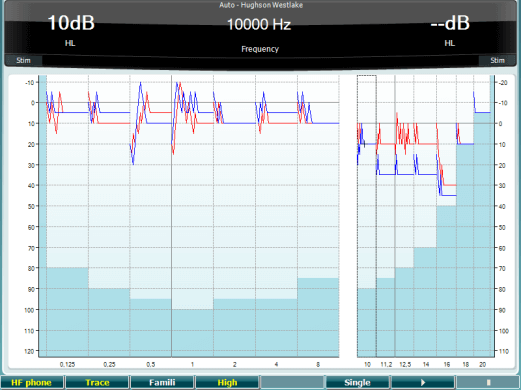
 

How to perform the Hughson-Westlake procedure

  1. Press and hold the Tests button and use the black scroll wheel to select Auto - Hughson Westlake.
  2. Instruct the patient that he will hear pulsed tones, which will vary in intensity and to press the button as soon as the tone is heard. Note If the response button is pressed after the patient heard the tones, the response will not be recorded. Therefore it is important to instruct the patient to press the response button as soon as the tone is heard.
  3. To familiarize the patient with the test, press the Famili and press Play.
  4. To start the test, deselect Famili, ensure to activate Trace and press Play.
  5. The Hughson-Westlake test will automatically store the threshold with 2 out of 3 (or 3 out of 5) ascending responses.
  6. All audiometric test frequencies will be measured automatically.
  7. The test will automatically switch to the other ear.
  8. To stop the test, press Stop.

To measure only one frequency, select the desired frequency and then press on the button Single.

To obtain a threshold including the high frequency range press the button High. Note The range is only available if it is selected in the Setup │ Auto settings.

 

Setup

Setup │ Auto settings allows for changing the threshold method 2 out of 3 or 3 out of 5. The frequencies included in the test is selected by ticking of the frequencies.
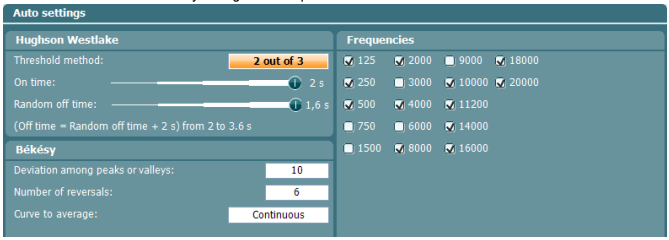
A list of settings for the Hughson-Westlake procedure and Békésy audiometry. For both tests, the following frequencies are ticked: 125, 250, 500, 2000, 4000, 8000, 10000, 11200, 140000, 16000, 18000, and 20000 Hz. For Hughson-Westlake, the threshold method is set to 2 out of 3. On time is set to two seconds. Random off time is set to 1.6 seconds. For Békésy, the devation among peaks or valleys is set to 10. The number of reversals is set to 6. And the curve to average is set to continuous.

Presenter

Interacoustics

Available Training

Accessing Saved Client Records

Learn how to access saved client records with the AC40 clinical audiometer.

Interacoustics2026-10-02

Alternate Binaural Loudness Balance Test

Learn how to perform the alternate binaural loudness balance (ABLB) test with the AC40 clinical audiometer, including results interpretation.

Interacoustics2026-10-02

Audiometer Overview

This video provides an overview of the AC40 clinical audiometer.

Interacoustics2026-10-02

Audiometric Masking

Learn how to perform audiometric masking with the AC40 clinical audiometer.

Interacoustics2026-10-02

Békésy Audiometry

Learn how to perform the Békésy audiometry test with the AC40 clinical audiometer, including the Békésy audiometry types for results interpretation. Learn more.

Interacoustics2026-10-02

BKB-SIN speech-in-noise test

In this quick guide, you will learn how to use the BKB-SIN speech-in-noise test provided with the Interacoustics AC40 clinical audiometer. Read more.

Interacoustics2026-10-02

Common Settings

Learn how to access and edit common settings with the AC40 clinical audiometer.

Interacoustics2026-10-02

High Frequency Audiometry

Learn how to perform high frequency audiometry with the AC40 clinical audiometer.

Interacoustics2026-10-02

How to Adjust Monitor Settings

Learn how to adjust monitor settings with the AC40 clinical audiometer.

Interacoustics2026-10-02

How to print without a database

Click here to learn about the three options you have for printing without a database with the AC40 clinical audiometer.

Interacoustics2026-10-02

Keyboard Buttons

This video provides an overview of the AC40 clinical audiometer's keyboard buttons.

Interacoustics2026-10-02

LCD Display Overview

This video provides an overview of the AC40 clinical audiometer's LCD display.

Interacoustics2026-10-02

Load User Settings

Learn how to load user settings with the AC40 clinical audiometer.

Interacoustics2026-10-02

Masking Level Difference (MLD)

Learn how to measure the masking level difference (MLD) with the AC40 clinical audiometer, including results interpretation.

Interacoustics2026-10-02

Pediatric Noise

Learn about the pediatric noise stimulus, which is available with the AC40 clinical audiometer.

Interacoustics2026-10-02

Pure Tone Audiometry

Learn how to perform pure tone audiometry with the AC40 clinical audiometer.

Interacoustics2026-10-02
