
Pediatric Noise

By Interacoustics

What is pediatric noise?

Pediatric noise is a special noise stimuli that can be used as an alternative for pure tones, warble tones and narrow band noise. The use of pediatric noise is useful during sound field testing and visual reinforcement audiometry (VRA) as it helps to avoid standing waves as well as maintain the child's interest during testing. In additional it is useful in other assessments, which requires narrow band noise such as pitch matching and minimum masking level.

Pediatric noise addresses two problems related to the use of narrow band noise.

1. Pediatric noise is calibrated in dB HL

In comparison, the narrow band noise is calibrated for effective masking of tonal sounds of the same dial setting. Practically speaking it means that the narrow band noise is a few dB louder than what is required for threshold measurements.

2. The shape of pediatric noise makes it frequency specific

While the plateau of the pediatric noise and narrow band noise are of the same width, the pediatric noise has very steep slopes, 100dB/octave vs. 12dB/octave respectively. In case of sloping hearing losses, the use of pediatric noise will not result in off-frequency listening.

Below graph illustrates the shape of the pediatric noise at 1000Hz.
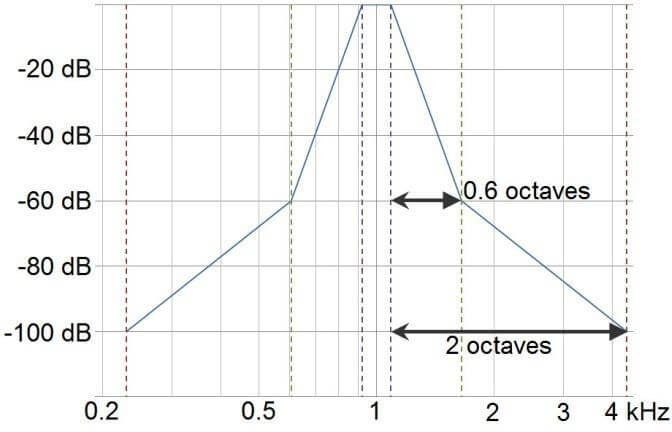
Graph with dB as a function of kHz. The curve is very steep, ascending from -100 db at 0.2 kHz to a peak at about 0 dB at 1 kHz, after which it descends to -100 dB again by 4 kHz.

Required equipment

  • Headphones, insert phones or free field setup (FF)
  • AC40

How to select pediatric noise

Ped noise can be run ad stand-alone on the audiometer or via Diagnostic Suite.
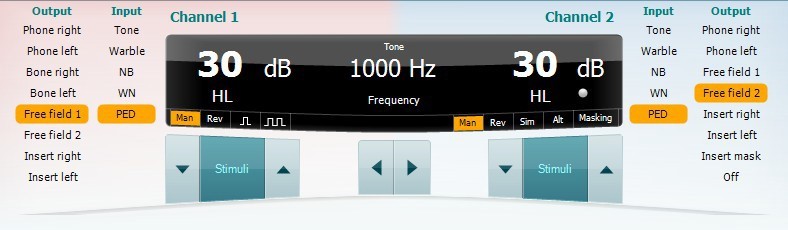
  1. On the standalone device, press Tests and use the wheel to select PED: pediatric noise.
    When in the PED test screen, the channel 1 Warble button will flash slowly, to indicate that the stimulus used is the pediatric noise. While using this protocol, the audiometer allows toggling from pediatric noise to tone, warble tone and back to pediatric noise.
    Note: If operated through Diagnostic Suite, pediatric noise (PED) will be available from the main tone screen in the selection of input.
  1. Conduct threshold evaluation using the pediatric noise for the desired audiometric evaluation method.

Presenter

Interacoustics

Available Training

Accessing Saved Client Records

Learn how to access saved client records with the AC40 clinical audiometer.

Interacoustics2026-10-02

Alternate Binaural Loudness Balance Test

Learn how to perform the alternate binaural loudness balance (ABLB) test with the AC40 clinical audiometer, including results interpretation.

Interacoustics2026-10-02

Audiometer Overview

This video provides an overview of the AC40 clinical audiometer.

Interacoustics2026-10-02

Audiometric Masking

Learn how to perform audiometric masking with the AC40 clinical audiometer.

Interacoustics2026-10-02

Békésy Audiometry

Learn how to perform the Békésy audiometry test with the AC40 clinical audiometer, including the Békésy audiometry types for results interpretation. Learn more.

Interacoustics2026-10-02

BKB-SIN speech-in-noise test

In this quick guide, you will learn how to use the BKB-SIN speech-in-noise test provided with the Interacoustics AC40 clinical audiometer. Read more.

Interacoustics2026-10-02

Common Settings

Learn how to access and edit common settings with the AC40 clinical audiometer.

Interacoustics2026-10-02

High Frequency Audiometry

Learn how to perform high frequency audiometry with the AC40 clinical audiometer.

Interacoustics2026-10-02

How to Adjust Monitor Settings

Learn how to adjust monitor settings with the AC40 clinical audiometer.

Interacoustics2026-10-02

How to print without a database

Click here to learn about the three options you have for printing without a database with the AC40 clinical audiometer.

Interacoustics2026-10-02

Hughson-Westlake Procedure

Learn how to perform the Hughson-Westlake procedure with the AC40 clinical audiometer.

Interacoustics2026-10-02

Keyboard Buttons

This video provides an overview of the AC40 clinical audiometer's keyboard buttons.

Interacoustics2026-10-02

LCD Display Overview

This video provides an overview of the AC40 clinical audiometer's LCD display.

Interacoustics2026-10-02

Load User Settings

Learn how to load user settings with the AC40 clinical audiometer.

Interacoustics2026-10-02

Masking Level Difference (MLD)

Learn how to measure the masking level difference (MLD) with the AC40 clinical audiometer, including results interpretation.

Interacoustics2026-10-02

Pure Tone Audiometry

Learn how to perform pure tone audiometry with the AC40 clinical audiometer.

Interacoustics2026-10-02