
How to use Ambient Noise with Equinox Evo

By Interacoustics

The Ambient Noise feature allows you to monitor the test environment for noise during audiometric testing. It is ideal when testing in non-optimal conditions or when testing via tele-audiometry.

Knowledge of your testing conditions will allow you to assess the validity of your measurements ahead of making a diagnosis.

Preparation

Ensure that you have the Ambient Noise microphone plugged into your Equinox Evo. The socket for this has been highlighted in the image below.

There are many sockets on the Equinox Evo. The Ambient Noise socket is located between the Talk Forward and AUX sockets, straight above the Bone socket.

Launch your Equinox Evo Suite and go into the AC440 Module.

The Ambient Noise monitor can be seen in the left panel of the AUD screen when enabled in your test protocol.

The below image shows the location of the Ambient Noise Settings in your Audiometry protocol.
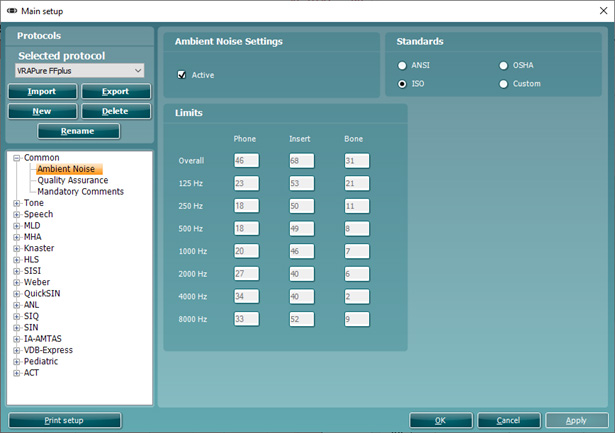
Ambient Noise is located in a tab called Common. The user has the following options. Toggle Ambient Noise to be active or inactive. Use ANSI, OSHA, ISO, or Custom standard. Set the dB limit per transducer at individual frequencies.

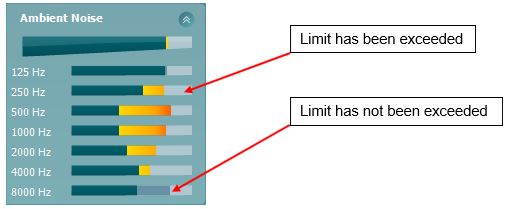
The Ambient Noise feature constantly shows the average noise level in the top bar and then individual frequency levels below. It will show darker bars (limits) and orange bars above this when the limit is exceeded, see example below.
The Ambient Noise feature operates according to specific guidance found in calibration standard documents. The applied settings can be found in the configuration of this feature in your protocol settings.
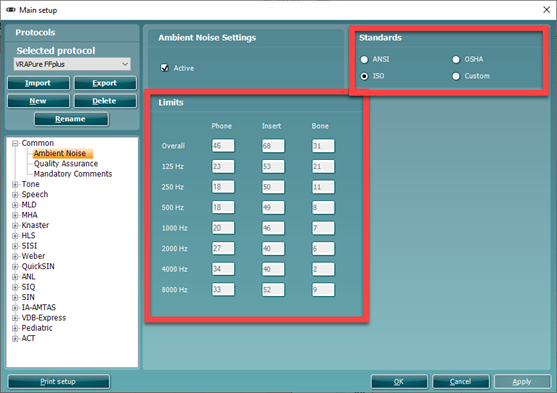
Toggling between the ANSI, OSHA, ISO, or Custom standards auto-populates the dB limit per transducer at individual frequencies.

In the Ambient Noise configuration, you have the option to activate the Ambient Noise feature.

You will also notice that there are boxes to input the limit levels for different transducers and their associated frequencies. You can only manually input these values when selecting a Custom standard. These will be greyed out when a standard is chosen (e.g. ANSI, OSHA or ISO).

Note: Despite this feature only being present in the AC440 module, you can still use this to assess your test environment ahead of performing REM or HIT measurements.

Presenter

Interacoustics

Available Training

How to perform the acceptable noise level (ANL) test with Equinox Evo

Click here to learn how to perform the acceptable noise level (ANL) test with the Equinox Evo clinical audiometer.

Interacoustics2026-10-02

How to perform the Alternate Binaural Loudness Balance (ABLB) test with Equinox Evo

Click here to learn how to perform the alternate binaural loudness balance (ABLB) test with the Equinox Evo clinical audiometer.

Interacoustics2026-10-02

How to perform audiometric masking with Equinox Evo

Learn how to perform audiometric masking with the Equinox Evo clinical audiometer.

Interacoustics2026-10-02

How to perform basic audiometry with Equinox Evo

Click here to learn how to perform basic audiometry with the Equinox Evo clinical audiometer.

Interacoustics2026-10-02

Equinox Suite: How to set up your VRA

Learn how to set up your visual reinforcement audiometry (VRA) using the Equinox Suite software with the Equinox Evo clinical audiometer.

Interacoustics2026-10-02

Equinox Evo: How to set up the assistant monitor

Learn how to set up the assistant monitor functionality using the Equinox Suite software with the Equinox Evo clinical audiometer.

Interacoustics2026-10-02

Equinox Suite: How to use the VRA feature

Learn how to use the visual reinforcement audiometry (VRA) feature in the Equinox Suite software with the Equinox Evo clinical audiometer.

Interacoustics2026-10-02

How to perform Free Field (FF) Adjustment with Equinox Evo

Click here to learn how to perform free field adjustment with the Equinox Evo clinical audiometer.

Interacoustics2026-10-02

How to perform High Frequency Audiometry with Equinox Evo

Click here to learn how to perform high frequency audiometry with the Equinox Evo clinical audiometer.

Interacoustics2026-10-02

How to print with Equinox Evo

Click here to learn how to print with the Equinox Evo clinical audiometer.

Interacoustics2026-10-02

How to perform IA-AMTAS with Equinox Evo

Click here to learn how to perform the IA-AMTAS automated audiometry test with the Equinox Evo clinical audiometer.

Interacoustics2026-10-02

How to perform Masking Level Difference (MLD) with Equinox Evo

Learn how to perform the masking level difference (MLD) test with the Equinox Evo clinical audiometer.

Interacoustics2026-10-02

PC keyboard shortcuts with Equinox Evo

Click here to access the PC keyboard shortcuts for the Equinox Evo clinical audiometer.

Interacoustics2026-10-02

How to use pediatric noise with Equinox Evo

Learn how to use the pediatric noise stimulus with the Equinox Evo clinical audiometer.

Interacoustics2026-10-02

How to set up protocols in the Equinox Evo software

Click here to learn how to set up protocols in the software for the Equinox Evo clinical audiometer.

Interacoustics2026-10-02

How to perform pure tone audiometry with Equinox Evo

Click here to learn how to perform pure tone audiometry with the Equinox Evo clinical audiometer.

Interacoustics2026-10-02