
How to perform basic audiometry with Equinox Evo

By Interacoustics

This quick guide will focus on basic pure tone audiometry functions as well as a basic introduction to the various icons, tools and menus available.


Starting up the AC440 module

Launch the Equinox Suite from Noah, OtoAccess®, or standalone.

Click on the eight note icon to launch the tone audiometry screen if tone audiometry is not the default screen.

Select the desired audiometry protocol from the "Protocols and Sessions" drop down list.


Conducting pure tone audiometry

Choose the transducer type and the stimulus type.

The table below shows how to choose the test frequency and intensity, and how to present the stimuli.


Test frequency Intensity Stimuli presentation
PC keyboard Left/right arrow keys Up/down arrow keys Space bar or left ctrl
Mouse Left/right arrow buttons Up/down arrow buttons Hover over 'Stimuli'
Touch Keyboard Left/right arrow buttons Dials Use stimuli touch field


Masking

Turn on masking in Channel 2 by ensuring that the desired transducer is selected for the non-test ear.

Ensure that the word "Masking" is highlighted in orange.

Choose "Rev" to present the masking noise continuously.

It is also possible to turn on Automasking or Masking Help.


Navigation: Tools and functions

We'll cover tools and functions briefly. For a more detailed description of how to use the AUD440 module, please refer to the Instructions for Use and Additional Information documents.


Menu

Click on Menu | Tests to access other special audiometric tests.


Protocols and sessions
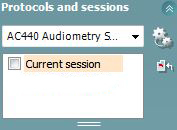
Choose the desired test and choose the session to display. Current Session is always the active session. Highlight and select older sessions to be displayed on the active audiogram for comparison.


Buttons
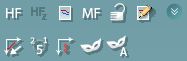
Access various tools and features for Tone Audiometry, including High Frequency Audiometry, Multifrequency Audiometry, Auto Masking, Masking Help and many others.


Talk and monitor

Activate/deactivate the Talk Forward and Monitor during testing together with the activation/deactivation of the Assistant Monitor headset.


Counseling overlays

Activate/deactivate useful tools when counseling patients about hearing loss.


Test symbols
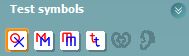
Choose from the available symbols to display on the audiogram, including the tinnitus symbol.


Comments

Use this feature to add comments relevant to the session.

Presenter

Interacoustics

Available Training

How to perform the acceptable noise level (ANL) test with Equinox Evo

Click here to learn how to perform the acceptable noise level (ANL) test with the Equinox Evo clinical audiometer.

Interacoustics2026-10-02

How to perform the Alternate Binaural Loudness Balance (ABLB) test with Equinox Evo

Click here to learn how to perform the alternate binaural loudness balance (ABLB) test with the Equinox Evo clinical audiometer.

Interacoustics2026-10-02

How to use Ambient Noise with Equinox Evo

Click hear to learn how to use the Ambient Noise feature with the Equinox Evo clinical audiometer.

Interacoustics2026-10-02

How to perform audiometric masking with Equinox Evo

Learn how to perform audiometric masking with the Equinox Evo clinical audiometer.

Interacoustics2026-10-02

Equinox Suite: How to set up your VRA

Learn how to set up your visual reinforcement audiometry (VRA) using the Equinox Suite software with the Equinox Evo clinical audiometer.

Interacoustics2026-10-02

Equinox Evo: How to set up the assistant monitor

Learn how to set up the assistant monitor functionality using the Equinox Suite software with the Equinox Evo clinical audiometer.

Interacoustics2026-10-02

Equinox Suite: How to use the VRA feature

Learn how to use the visual reinforcement audiometry (VRA) feature in the Equinox Suite software with the Equinox Evo clinical audiometer.

Interacoustics2026-10-02

How to perform Free Field (FF) Adjustment with Equinox Evo

Click here to learn how to perform free field adjustment with the Equinox Evo clinical audiometer.

Interacoustics2026-10-02

How to perform High Frequency Audiometry with Equinox Evo

Click here to learn how to perform high frequency audiometry with the Equinox Evo clinical audiometer.

Interacoustics2026-10-02

How to print with Equinox Evo

Click here to learn how to print with the Equinox Evo clinical audiometer.

Interacoustics2026-10-02

How to perform IA-AMTAS with Equinox Evo

Click here to learn how to perform the IA-AMTAS automated audiometry test with the Equinox Evo clinical audiometer.

Interacoustics2026-10-02

How to perform Masking Level Difference (MLD) with Equinox Evo

Learn how to perform the masking level difference (MLD) test with the Equinox Evo clinical audiometer.

Interacoustics2026-10-02

PC keyboard shortcuts with Equinox Evo

Click here to access the PC keyboard shortcuts for the Equinox Evo clinical audiometer.

Interacoustics2026-10-02

How to use pediatric noise with Equinox Evo

Learn how to use the pediatric noise stimulus with the Equinox Evo clinical audiometer.

Interacoustics2026-10-02

How to set up protocols in the Equinox Evo software

Click here to learn how to set up protocols in the software for the Equinox Evo clinical audiometer.

Interacoustics2026-10-02

How to perform pure tone audiometry with Equinox Evo

Click here to learn how to perform pure tone audiometry with the Equinox Evo clinical audiometer.

Interacoustics2026-10-02