How to Verify Directional Hearing Aids

By Interacoustics


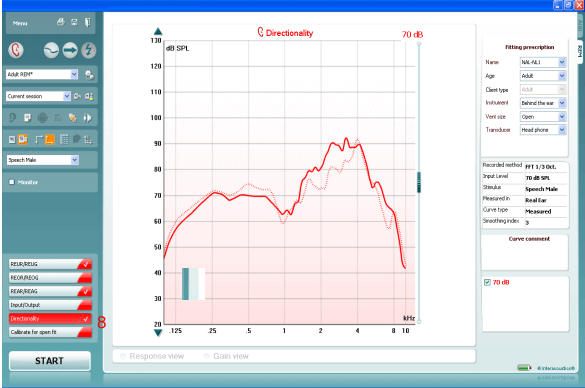
Directionality Test using Real Ear Measurements

  1. From your patient management system, Noah or OtoAccess®, launch the Affinity or Suite.
  2. Launch the REM440 module by clicking on the REM tab.
  3. Prepare the patient for Real Ear Measures.
  4. Calibrate the probe tube.
  5. If fitting an open hearing instrument, perform Calibrate for open fit.
  6. Ensure that the correct Ear is selected.
  7. To activate the Directional Test, go to: Menu | Setup | Show/hide protocols | US | Standard Directionality. Insert the checkmark inside the box in front of Standard Directionality. This will ensure that the Directionality test is available from the list of protocols drop down menu (f choosing US country defaults during the Affinity or Callisto software installation, the Directionality test will be available by default)
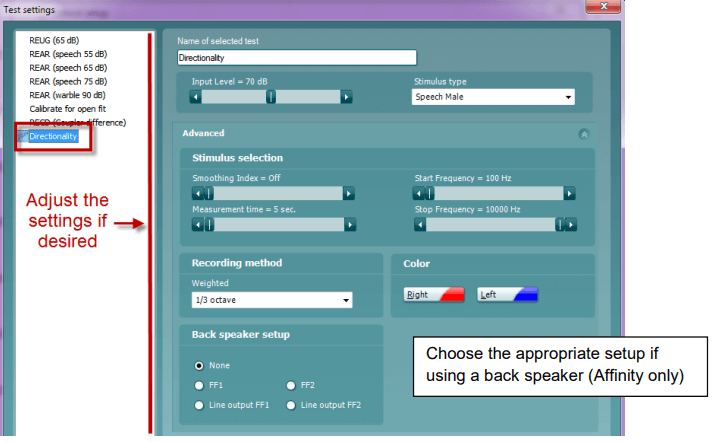
  8. Choose the preferred Stimulus in the corresponding dropdown list.
  9. Change the input level using the slider if desired.
  10. Click START and follow the instructions on screen
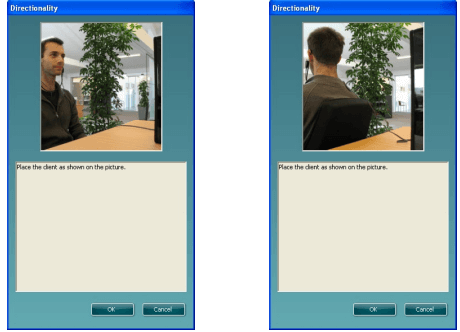
  11. Place the client in front of the loudspeaker as shown on the picture. Click OK and front microphone curve will be recorded. New instructions will immediately appear. Turn the client around and click OK.
 

How to add the directionality test to an existing protocol

  1. Go to Menu | Setup | REM440 Setup.
  2. Choose a protocol to copy (ex: Adult Aided Response) from the drop down list.
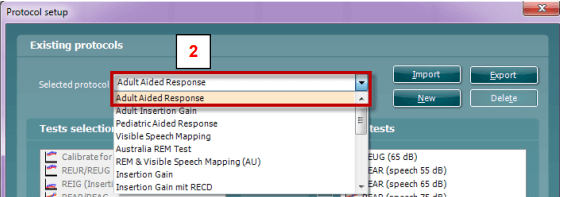
  3. Click New to create a new protocol.
  4. Click Yes when the software asks if you want to copy the currently selected protocol (If selecting NO, you will have to create the protocol from scratch, which is beyond the scope of this document. For more info, please refer
    to the Instructions for Use document, Additional Info document or Quick Guide on Protocol Setup )
  5. Rename the Protocol.
  6. Add the Directionality test to the existing protocol.
  7. Edit the settings if desired by clicking on the Settings button
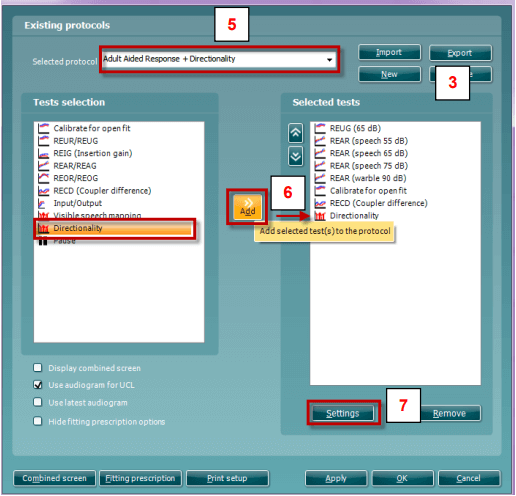
  8. Adjust the Settings if desired .

Presenter

Interacoustics

Available Training

Acceptable Noise Level (ANL) Test

Learn how to perform the acceptable noise level (ANL) test with the Affinity 2.0 device.

Interacoustics2026-10-02

AC440 Protocol Setup

There are many different demands and wishes regarding how an audiometer should both function and appear depending on the specific situation and national standards. One of the greatest advantages of the AC440 module is the flexibility, enabling you to tailor the system according to your specific preferences in the so-called “test protocols”. This article describes basic functionality on how to work with the AC440 Protocols.

Interacoustics2026-10-02

Adult Hearing Aid Verification

Learn how to verifiy hearing aids in adults with the Affinity 2.0 device, using real ear measurements (REM).

Interacoustics2026-10-02

Basic Audiometry

Learn how to do basic audiometry with the Affinity 2.0 device.

Interacoustics2026-10-02

Binaural Real Ear Measurements

Learn how to perform binaural real ear measurements (REM) with the Affinity 2.0.

Interacoustics2026-10-02

BKB-SIN speech-in-noise test

In this quick guide, you will learn how to use the BKB-SIN speech-in-noise test provided with the Interacoustics Affinity 2.0 audiometer. Read more.

Interacoustics2026-10-02

How to perform CROS and BiCROS fitting

Learn how to fit CROS and BiCROS hearing aids with the Affinity 2.0 device.

Interacoustics2026-10-02

How to customize icons

Learn how to customize icons with the Affinity.

Dennis Mistry2026-10-02

How to perform FM transparency verification

In this Affinity 2.0 quick guide, you'll learn how to perform FM transparency verification. Read more.

Interacoustics2026-10-02

How to perform frequency lowering verification

In this Affinity 2.0 quick guide, you'll learn how to determine if you should apply frequency lowering and how to verify the frequency lowering feature.

Interacoustics2026-10-02

Delta Values

Learn how to get a more accurate target match when fitting hearing aids with the Affinity.

Dennis Mistry2026-10-02

Hearing Instrument Testing

Learn how to perform hearing instrument testing with the Affinity 2.0 device.

Interacoustics2026-10-02

HIT440 Test Protocol

Learn how to set up protocols in the Affinity's hearing instrument testing module.

Interacoustics2026-10-02

How to Create a New Protocol in REM440

Learn how to create protocols in the Affinity's real-ear measurement module.

Leigh Martin2026-10-02

How to do an RECD Using the SPL60 Probe

Learn how to do an RECD using the SPL60 probe.

Leigh Martin2026-10-02

How to do Pure Tone Audiometry

Learn how to do pure tone audiometry with the Affinity.

Dennis Mistry2026-10-02