
Speech in Quiet (SIQ) Test
What is the speech in quiet (SIQ) test?
The SIQ test is a method of testing a patient's functional hearing in the absence of any competing sound. The objective of this is to identify their functional hearing ability (Schoepflin, 2012). The outcome of this investigation will give a Speech Recognition Threshold (SRT).
This type of testing is different from Tone Audiometry as it involves higher areas of the Auditory pathway as the information needs to be heard, processed and repeated in order to give a correct response (National Research Council (US), 2004).
The SIQ test is designed to be performed via loudspeaker as it is a free field test. However it can be configured to perform monaurally via selection of headphones and routing the signal to the relevant ear-side.
The SIQ test is very similar to Speech Audiometry and can use any of the materials you have already ripped into your Interacoustics Suite software. However the Stimulus intensity is maintained automatically by the software following a correct or incorrect response to the stimulus, this helps to speed up the test time.
When to perform the SIQ test?
It is normal to perform this following Tone Audiometry as it gives a good indicator of the patient s performance for speech, it can also be a good indicator of the accuracy of your audiogram (Mehta & Singh, 2000). It can also be used before and after the provision of hearing aids to give an identification of the benefit achieved through amplification (REF).
SIQ test procedure
- Launch the Affinity Suite from Noah or OtoAccess®.
- Click on the AUD tab on the upper right hand side of the screen. Ensure that your Audiometry has been performed ahead of advancing into the SIN test as this determines the start level for the test.
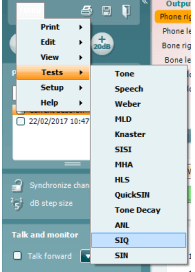
- Click on Menu, Tests and then select SIQ
Once in the SIQ test screen, the stimuli levels should be set for you. These are based on the patient audiogram and the PTA score.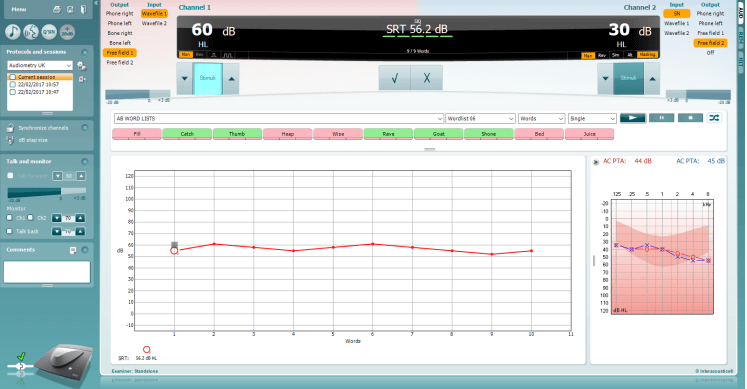
- Ensure that your speech material is correct and the relevant list has been chosen.
- Instruct the patient to respond by repeating the words that they hear. Press the play icon to begin the test.
- On the patients' response, score the words correct or incorrect according to their response. The system will automatically increase the next stimulus intensity for an incorrect response and decrease the next stimulus intensity for a correct response.
- Repeat this procedure until your word list has completed. The system will automatically store on completion of your word list.
References
Mehta and Singh. (2000). Screening Tests for Non-Organic Hearing Loss. [online] Available at: http://medind.nic.in/maa/t00/i1/maat00i1p79.pdf [Accessed 8 Mar. 2017].
National Research Council (US) Committee on Disability Determination for Individuals with Hearing Impairments; Dobie RA, Van Hemel S, editors. Hearing Loss: Determining Eligibility for Social Security Benefits. Washington (DC): National Academies Press (US); 2004. 3, Assessment of the Auditory System and Its Functions. Available from: https://www.ncbi.nlm.nih.gov/books/NBK207835/ [Accessed 8 Mar. 2017].
Schoepflin, J. (2012). Back to Basics: Speech Audiometry Janet R. Schoepflin. [online] AudiologyOnline. Available at: http://www.audiologyonline.com/articles/back-to-basics-speech-audiometry-6828 [Accessed 8 Mar. 2017].
Presenter
