
TEN Test in AC440
What is the threshold equalizing noise (TEN) test?
The TEN(HL) test was developed to provide clinicians with a quick and easy way to identify cochlear dead regions. The test consists of measuring pure tone thresholds in a special masking noise, called the TEN (Threshold Equalizing Noise).
What is a cochlear dead region?
A dead cochlear region is defined as a region of the cochlea where there are no functioning inner hair cells and/or neurons. (Moore, 2001). When a pure-tone signal "falls" into a dead region, it can be heard by neighboring hair cells, if the intensity of the signal is loud enough. This is because the pure tone produces sufficient basilar-membrane vibrations in neighboring areas of the cochlea, where there are surviving IHCs and neurons. This phenomenon is defined as "Off Frequency Listening". Clinically, this will present as a threshold on the traditional pure tone audiogram, but it may not be the real threshold. It is not possible to use traditional pure tone audiometry to determine if there is a dead region present; the TEN test was developed for this very purpose.
Characteristics that could indicate the presence of a cochlear dead region
- Severe to profound hearing loss
- Absolute threshold is at a specific (suspected) frequency is 70 dB HL or greater
- Steeply sloping hearing loss
- Complaints of distortion
- Extremely poor speech discrimination
Criteria for diagnosing a cochlear dead region
A dead region at a particular frequency is indicated when a masked threshold is at least 10 dB or more above the level of the TEN and the masked threshold is at least 10 dB above the non-masked threshold.
TEN test procedure
NOTE: the TEN test is performed ipsilaterally, meaning that the tone and the noise are presented in the same ear. It can only be conducted with TDH39, DD45 and Insert earphones headphones
Setup
- Launch the Affinity Suite from your patient management system, Noah or OtoAccess®
- Ensure you are in the AUD module (click on the AUD tab on right hand side of the screen if not)
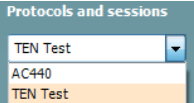
- Choose TEN test1 from the Protocols and sessions drop down menu
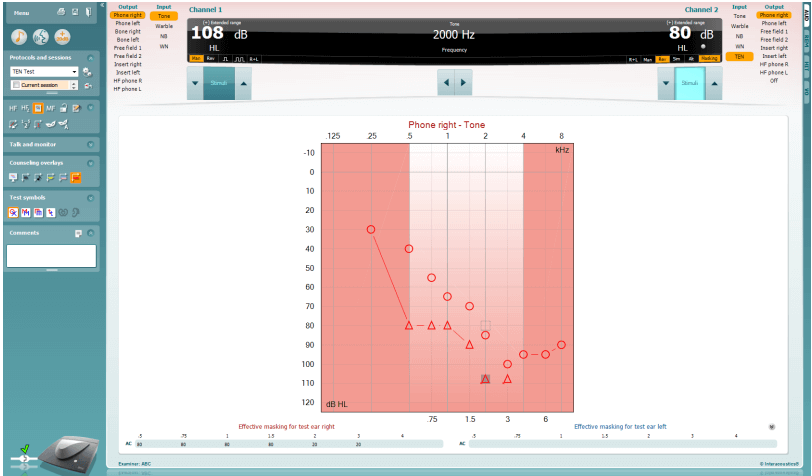
- Transducers: Select the desired transducer and ensure that the stimulus is directed to the same ear in channel 1 and channel 2 (see below). If testing the right ear, select Phone right for both channels (see below)
- Stimulus/Input: Tone for Channel 1 and TEN for channel 2 (see below)
- Set the masking to Rev to have a continuous masking signal. To stop the masking, click on Man or hover the mouse over the Stimuli button (see below)

- Set the intensity levels (Moore, 2009)
- For frequencies where hearing loss up to 60 dB HL: set the TEN level to 70 dB
- For frequencies where hearing loss is 70 dB or more: set the TEN level 10 dB above the audiometric threshold at that frequency. For example, if the audiometric threshold is 75 dB HL, set the TEN level to 85 dB HL
- If the TEN is too loud, or if the maximum TEN level of 90 dB HL is reached, then set the TEN level equal to the audiometric threshold. This should still give a definitive result
- Conduct a threshold search using the traditional method for air conduction
- Repeat for each frequency where a dead region is suspected
Positive TEN test
A dead region at a particular frequency is indicated when a masked threshold is at least 10 dB or more above the level of the TEN and the masked threshold is at least 10 dB above the non-masked threshold.
Clinical value of TEN test
If dead regions are present, this may have important implications for fitting hearing aids and for predicting the likely benefit of hearing aids. When a patient has a dead region, there may be little or no benefit from hearing aid amplification for frequencies well inside the dead region (Moore 2009).
Identifying a cochlear dead region can:
- Help counsel the patient and manage expectations regarding the potential benefit of hearing aids
- Help on choice of type of hearing aid
- Help determine if a patient would be a good candidate for cochlear implants
- Patient might do better with an implant when there are extensive dead regions
- Helps determine insertion depth
References
Moore, B. C. J. (2001). "Dead regions in the cochlea: Diagnosis, perceptual consequences, and implications for the fitting of hearing aids," Trends Amplif. 5, 1-34.
Moore, B. C. J. (2009). "Audiometer Implementation of the TEN (HL) Test for Diagnosing Cochlear Dead Regions".
Presenter
